HAPPYTEAM
From Chaos to Clarity — Optimizing Help Desk Communication Software
[case.study]
[ui—ux.design]
[web.app]
[crm.dashboard]
[desktop]
[mobile]
[2023]
HAPPYTEAM
From Chaos to Clarity — Optimizing Help Desk Communication Software
[case.study]
[ui—ux.design]
[web.app]
[crm.dashboard]
[desktop]
[mobile]
[2023]
[approach]
[approach]
Secondary Research
Comparative Research
Usability Testing
[role]
[role]
UX Researcher
UI/UX Designer
[timeframe]
[timeframe]
2 Weeks
[tools]
[tools]

[approach]
Secondary Research
Comparative Research
Usability Testing
[role]
UX Researcher
UI/UX Designer
[timeframe]
2 Weeks
[tools]
[overview]
[overview]
Customer Service has always been crucial to numerous industries, especially now in an era where consumers don’t hesitate to post negative reviews when faced with poor service. As the direct bridge between customers and businesses, it is essential for brands to deliver their service experience with the utmost care.
However, many companies eventually struggle to maintain top-notch support. Handling multi-channel communication is far from simple, and this is where the right customer service software becomes indispensable.

HAPPYTEAM was designed to answer this challenge by offering a clear, intuitive, and secure help desk platform that streamlines ticket management, fosters team collaboration, ensures SLA compliance, and provides actionable analytics. With HAPPYTEAM, chaotic customer interactions are transformed into organized, efficient, and responsive experiences.
Customer Service has always been crucial to numerous industries, especially now in an era where consumers don’t hesitate to post negative reviews when faced with poor service. As the direct bridge between customers and businesses, it is essential for brands to deliver their service experience with the utmost care.
However, many companies eventually struggle to maintain top-notch support. Handling multi-channel communication is far from simple, and this is where the right customer service software becomes indispensable.
HAPPYTEAM was designed to answer this challenge by offering a clear, intuitive, and secure help desk platform that streamlines ticket management, fosters team collaboration, ensures SLA compliance, and provides actionable analytics. With HAPPYTEAM, chaotic customer interactions are transformed into organized, efficient, and responsive experiences.
DESIGN PROCESS
DESIGN PROCESS


01.
01.
Understanding Design Brief and Scope
Understanding Design Brief and Scope
[design.requirements]
[design.requirements]
Ticket Management
Knowledge Base
Automated Workflows
Team Collaboration
Customer Communication Channels
SLA (Service Level Agreement)
Management
Reporting and Analytics
[design.consideration]
[design.consideration]
Intuitive and User Friendly
Customzation and Branding
Data Security and Privacy
Scability and Performance
[target.user]
[target.user]
Customer Support Teams
Help Desk Professionals
[design.requirements]
Ticket Management
Knowledge Base
Automated Workflows
Team Collaboration
Customer Communication Channels
SLA (Service Level Agreement)
Management
Reporting and Analytics
[design.consideration]
Intuitive and User Friendly
Customzation and Branding
Data Security and Privacy
Scability and Performance
[target.user]
Customer Support Teams
Help Desk Professionals
02.
02.
Secondary Research and Comparative Analysis
Secondary Research and Comparative Analysis
[my.research]
[my.research]
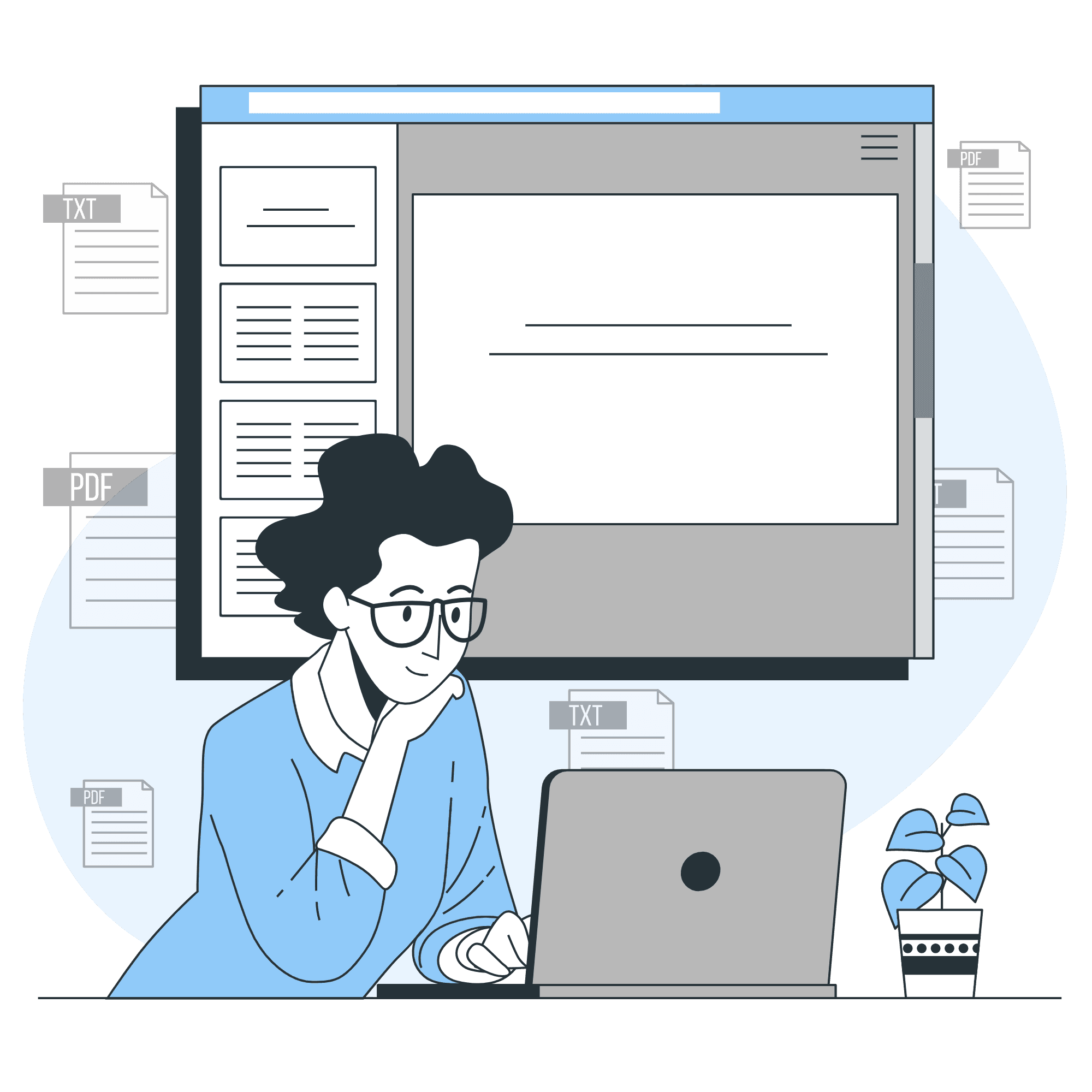
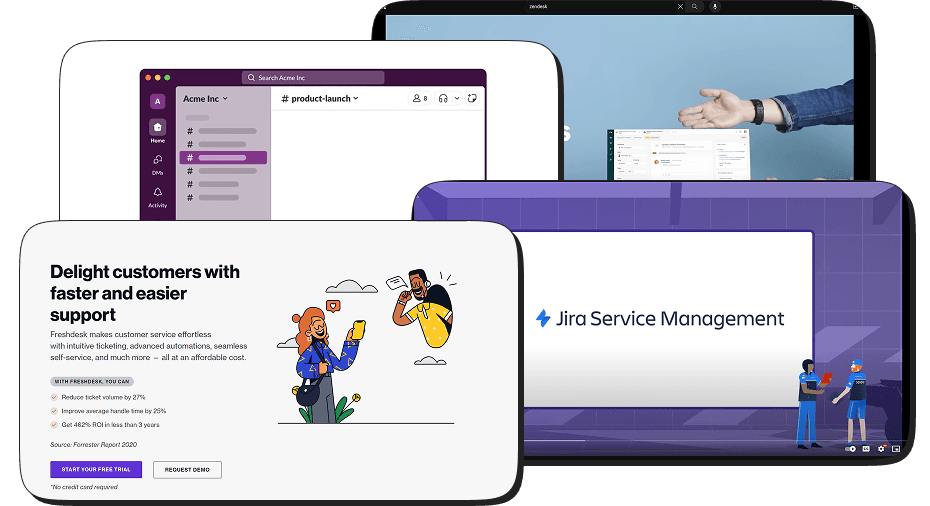
In this project, I conducted desk research by referencing Slack for team communication and Zendesk, Freshdesk, Jira for help desks. I also created accounts on these platforms to better understand their structures and information architectures, providing valuable insights for the HappyTeam concept.
In this project, I conducted desk research by referencing Slack for team communication and Zendesk, Freshdesk, Jira for help desks. I also created accounts on these platforms to better understand their structures and information architectures, providing valuable insights for the HappyTeam concept.
COMPARATIVE ANALYSIS
COMPARATIVE ANALYSIS
[01]
ZENDESK
Customer support and helpdesk software.
Focuses on managing customer inquiries and support tickets.
Offers features like ticket management, knowledge base, and live chat.
[02]
FRESHDESK
Customer support and helpdesk software.
Designed for small to medium-sized businesses.
User-friendly with automation and self-service options.
[03]
JIRA SERVICE MANAGEMENT
IT service management and helpdesk tool (formerly Jira Service Desk).
Primarily used for IT processes and issue tracking.
Integrates with other Atlassian products for comprehensive service management.
[04]
SLACK
Team collaboration platform.
Emphasizes real-time communication and collaboration within teams.
Integrates with various third-party apps and services.
[01]
ZENDESK
Customer support and helpdesk software.
Focuses on managing customer inquiries and support tickets.
Offers features like ticket management, knowledge base, and live chat.
[02]
FRESHDESK
Customer support and helpdesk software. Designed for small to medium-sized businesses. User-friendly with automation and self-service options.
[03]
JIRA SERVICE MANAGEMENT
IT service management and helpdesk tool (formerly Jira Service Desk).
Primarily used for IT processes and issue tracking.
Integrates with other Atlassian products for comprehensive service management.
[04]
SLACK
Team collaboration platform.
Emphasizes real-time communication and collaboration within teams.
Integrates with various third-party apps and services.
[conclusion]
[conclusion]
Base on secondary research, and comparative research findings, HappyTeam's system design will focus on creating a user-friendly, customizable, and secure platform with an emphasis on scalability and high performance. This approach ensures an intuitive experience, aligns with client branding, maintains data privacy, and accommodates future growth, meeting the diverse needs of event managers and users.
Base on secondary research, and comparative research findings, HappyTeam's system design will focus on creating a user-friendly, customizable, and secure platform with an emphasis on scalability and high performance. This approach ensures an intuitive experience, aligns with client branding, maintains data privacy, and accommodates future growth, meeting the diverse needs of event managers and users.
03.
03.
Ideation, Creating Design, and Prototyping
Ideation, Creating Design, and Prototyping
[design.style]
[design.style]
Design style in UI/UX refers to the visual presentation and aesthetic decisions made in the interface of a digital product. These choices, which can include flat design, material design, minimalism, and various others, have a significant influence on the user experience and the product's brand identity.
Design style in UI/UX refers to the visual presentation and aesthetic decisions made in the interface of a digital product. These choices, which can include flat design, material design, minimalism, and various others, have a significant influence on the user experience and the product's brand identity.
STYLE GUIDE
STYLE GUIDE
Color Pallete
Primary
#0071B3
#00A3FF
#D8F1FF
#F6FBFF
Accent
#1AD180
#2DCCFF
#FFB302
#FF3838
#FFD8D8
#D8F1FF
Greyscale
#585858
#989898
#C4C4C
#F2F2F2
Typography
[Manrope]
Aa
32 Bold
Aa
24 Bold
Aa
24 Black
Aa
20 Bold
Aa
16 Medium
Aa
14 Regular
brown fox
jumps over
the lazy dog
Color Pallete
Primary
#0071B3
#00A3FF
#D8F1FF
#F6FBFF
Accent
#1AD180
#2DCCFF
#FFB302
#FF3838
#FFD8D8
#D8F1FF
Greyscale
#585858
#989898
#C4C4C
#F2F2F2
Typography
[Manrope]
Aa
32 Bold
Aa
24 Bold
Aa
24 Black
Aa
20 Bold
Aa
16 Medium
Aa
14 Regular
brown fox
jumps over
the lazy dog
[wireframe.&.information.architecture]
[wireframe.&.information.architecture]
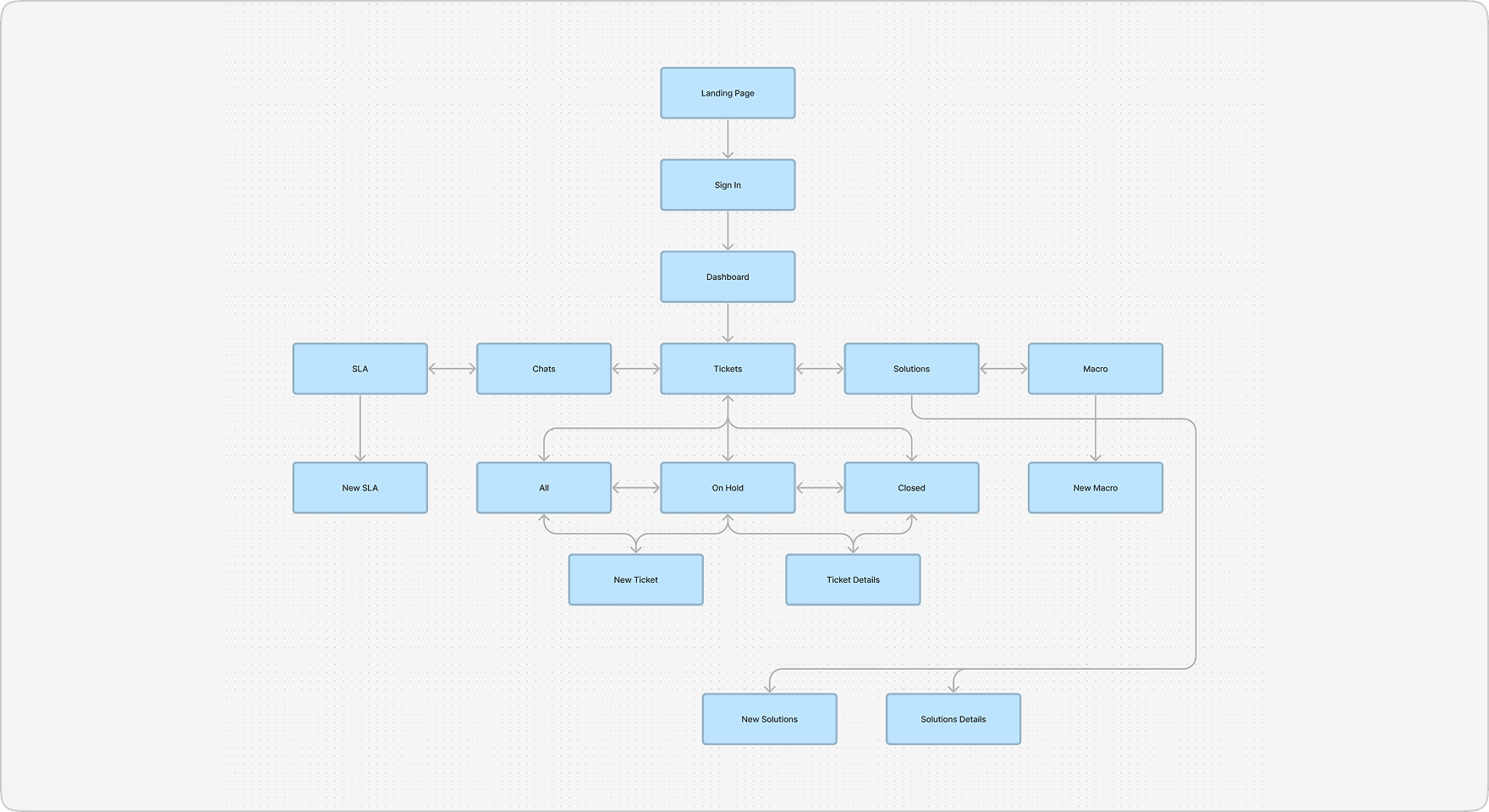
A user flow directs users through a process, encompassing their actions and choices to create an intuitive user experience. A sitemap provides a visual representation of the product's structure, assisting with content organization and navigation. It serves as the basis for creating wireframes and facilitates communication among stakeholders.
A user flow directs users through a process, encompassing their actions and choices to create an intuitive user experience. A sitemap provides a visual representation of the product's structure, assisting with content organization and navigation. It serves as the basis for creating wireframes and facilitates communication among stakeholders.
[site.map]
[user.flow]
[site.map]
[user.flow]
[ui.solutions]
[ui.solutions]
To resolve the problem of limited information visibility on the current website, I have created a new website that prioritizes improved readability. Through strategic categorization and hierarchical organization of content, users can readily access and comprehend the information. Furthermore, each page features clear and fitting calls to action to ensure the best possible user engagement.
To resolve the problem of limited information visibility on the current website, I have created a new website that prioritizes improved readability. Through strategic categorization and hierarchical organization of content, users can readily access and comprehend the information. Furthermore, each page features clear and fitting calls to action to ensure the best possible user engagement.
UI DESIGN
UI DESIGN
[01]
LOGIN PAGE
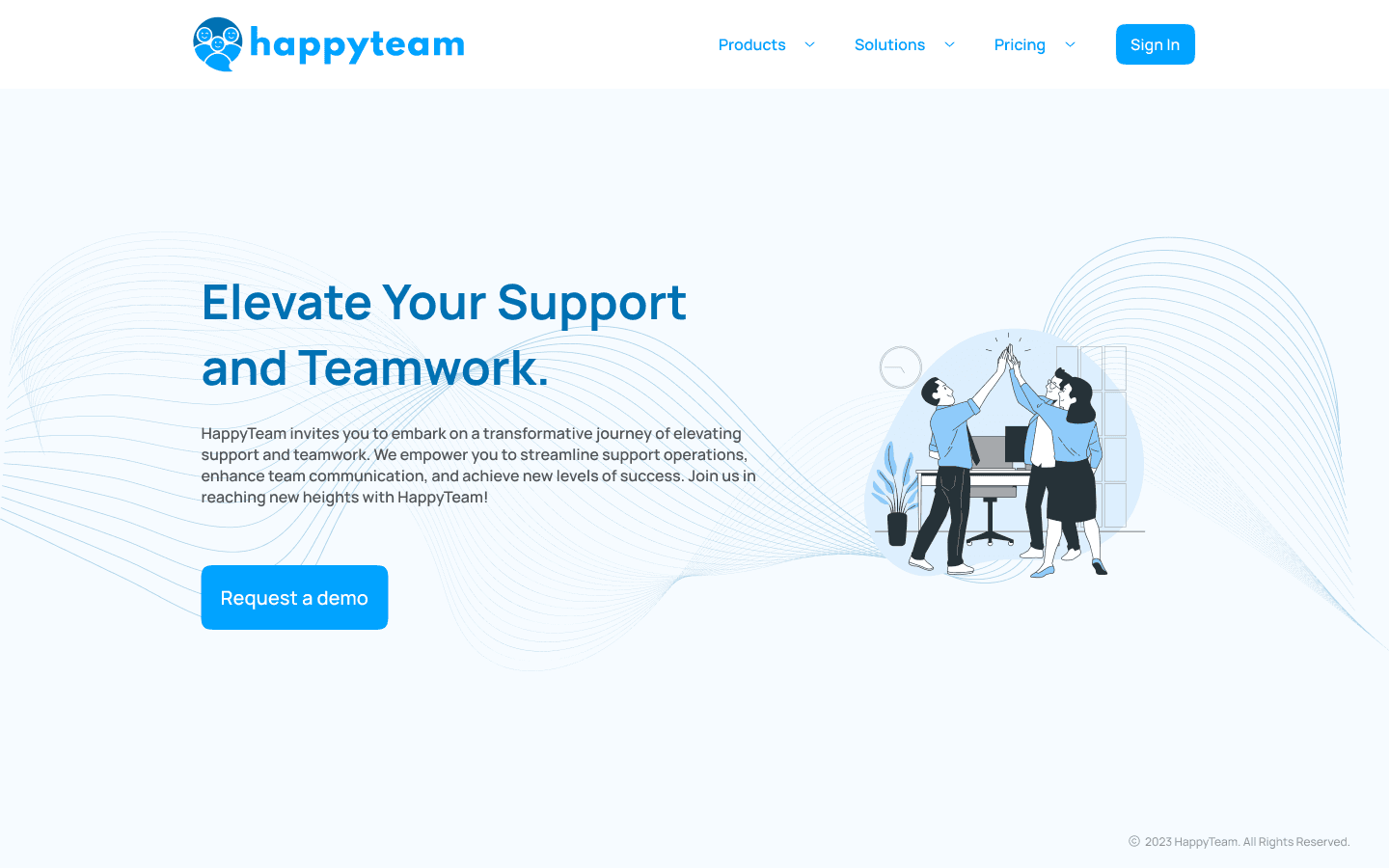
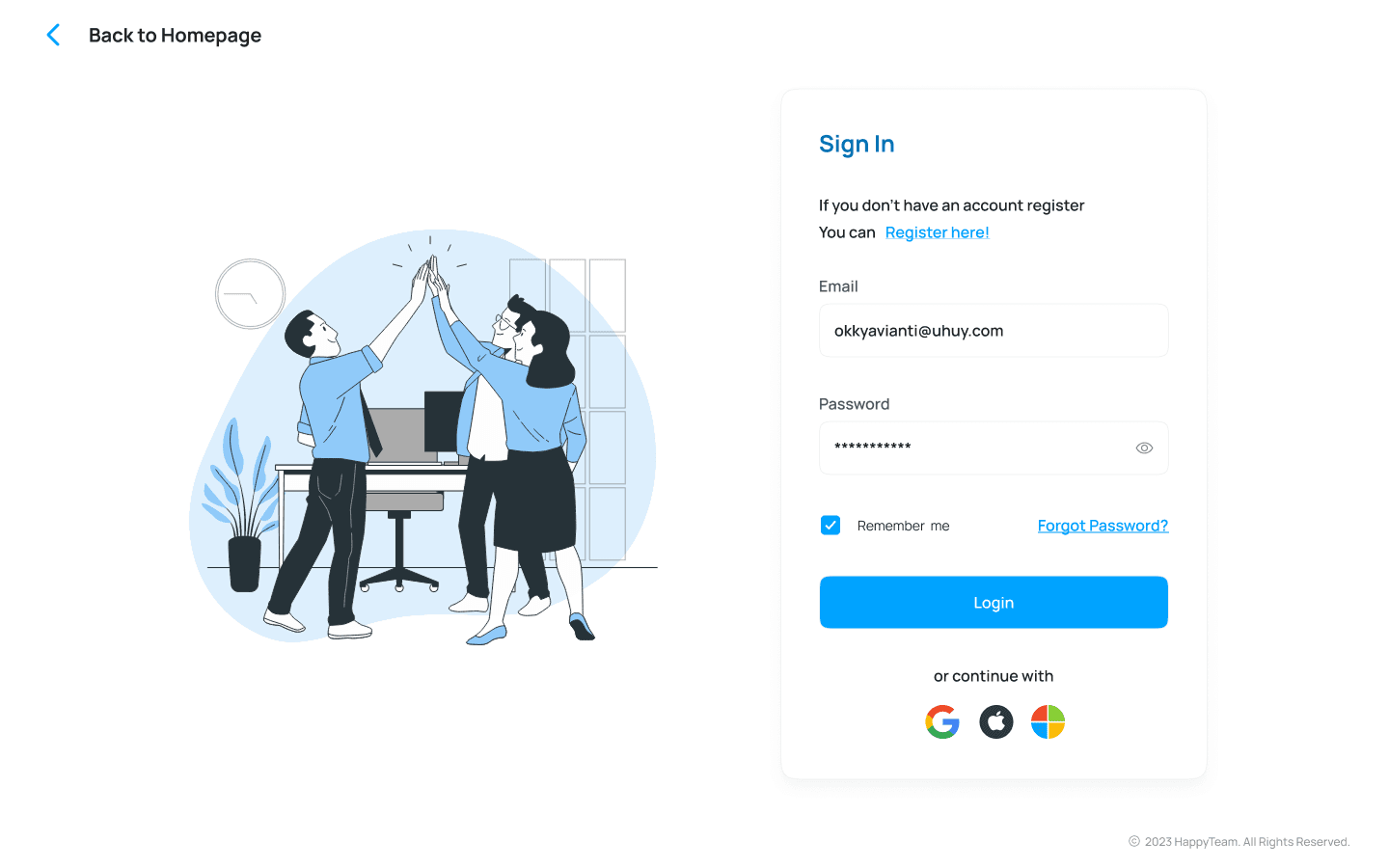
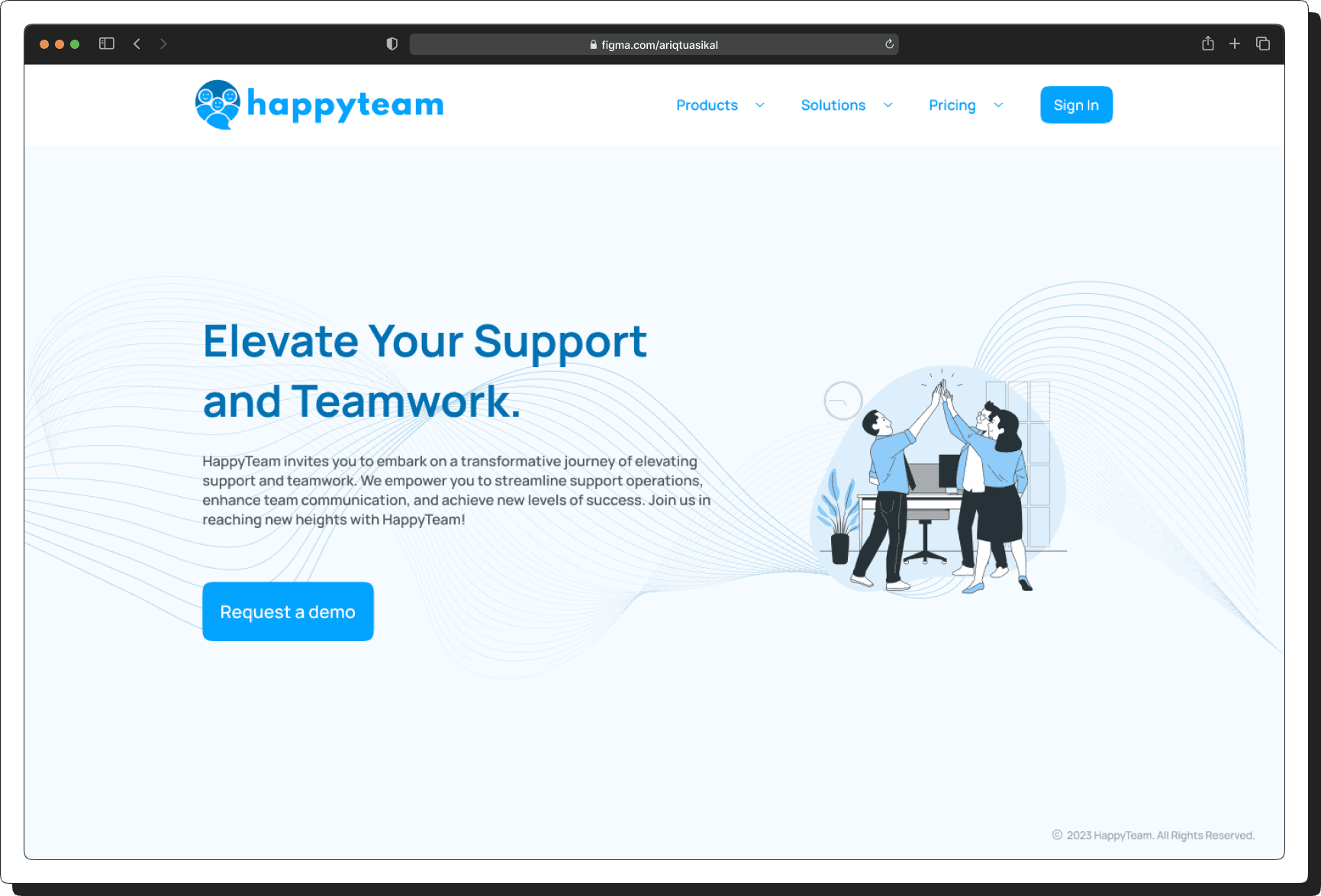
When visitors access HappyTeam, they are presented with two options: if they don't already have an account, they can create one by signing up. If they already have an account, they can simply log in.
[02]
DASHBOARD
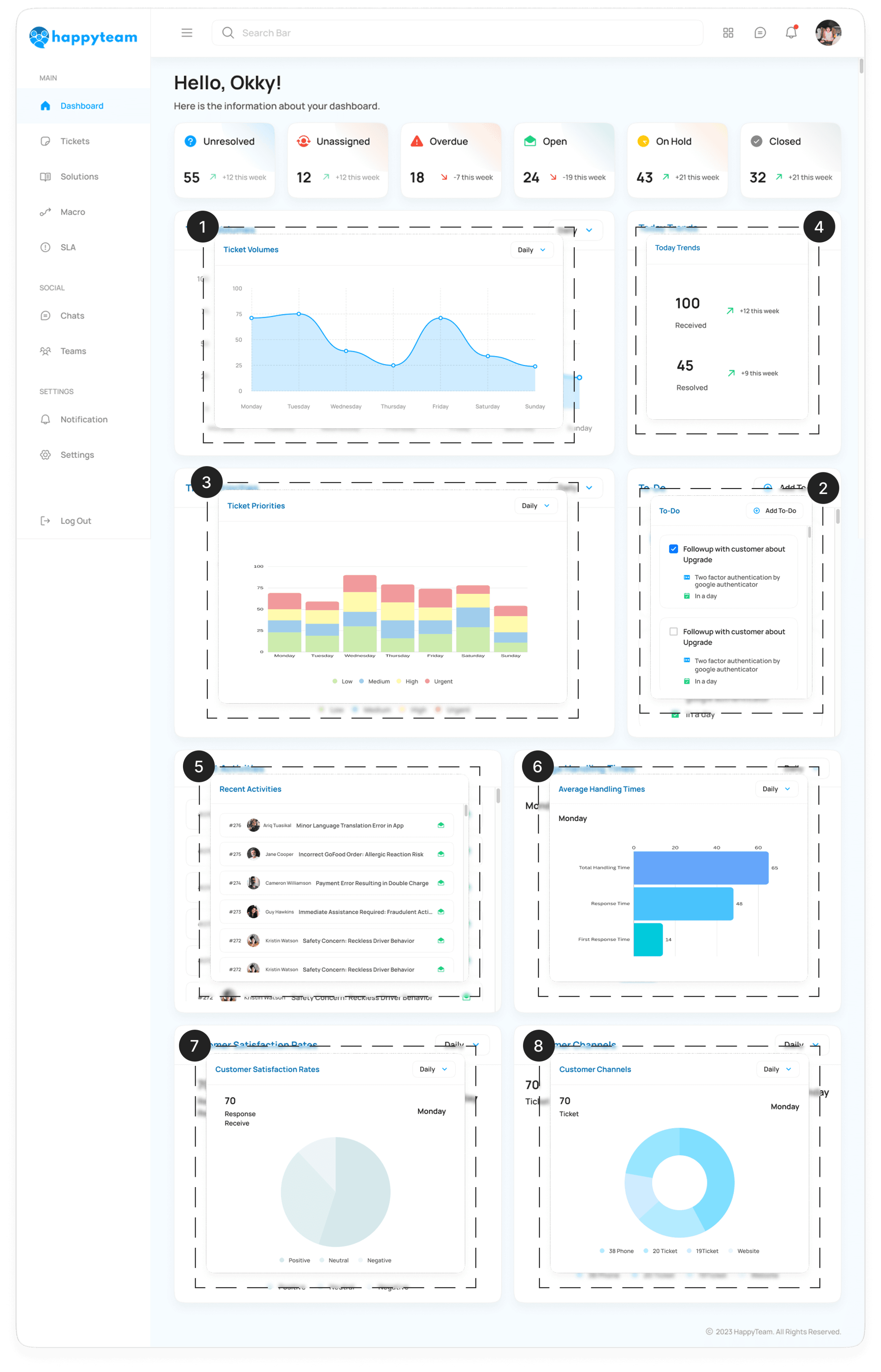
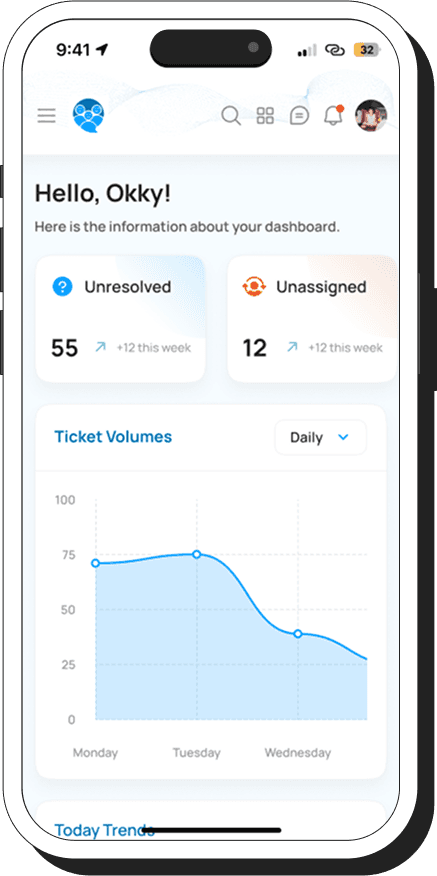
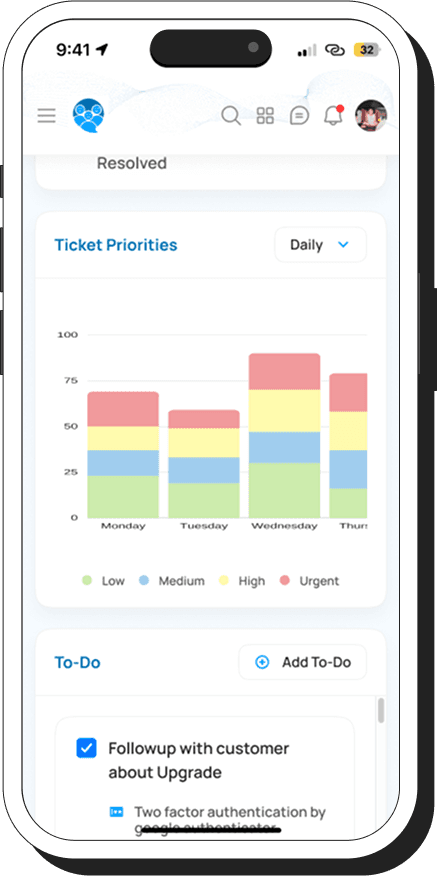
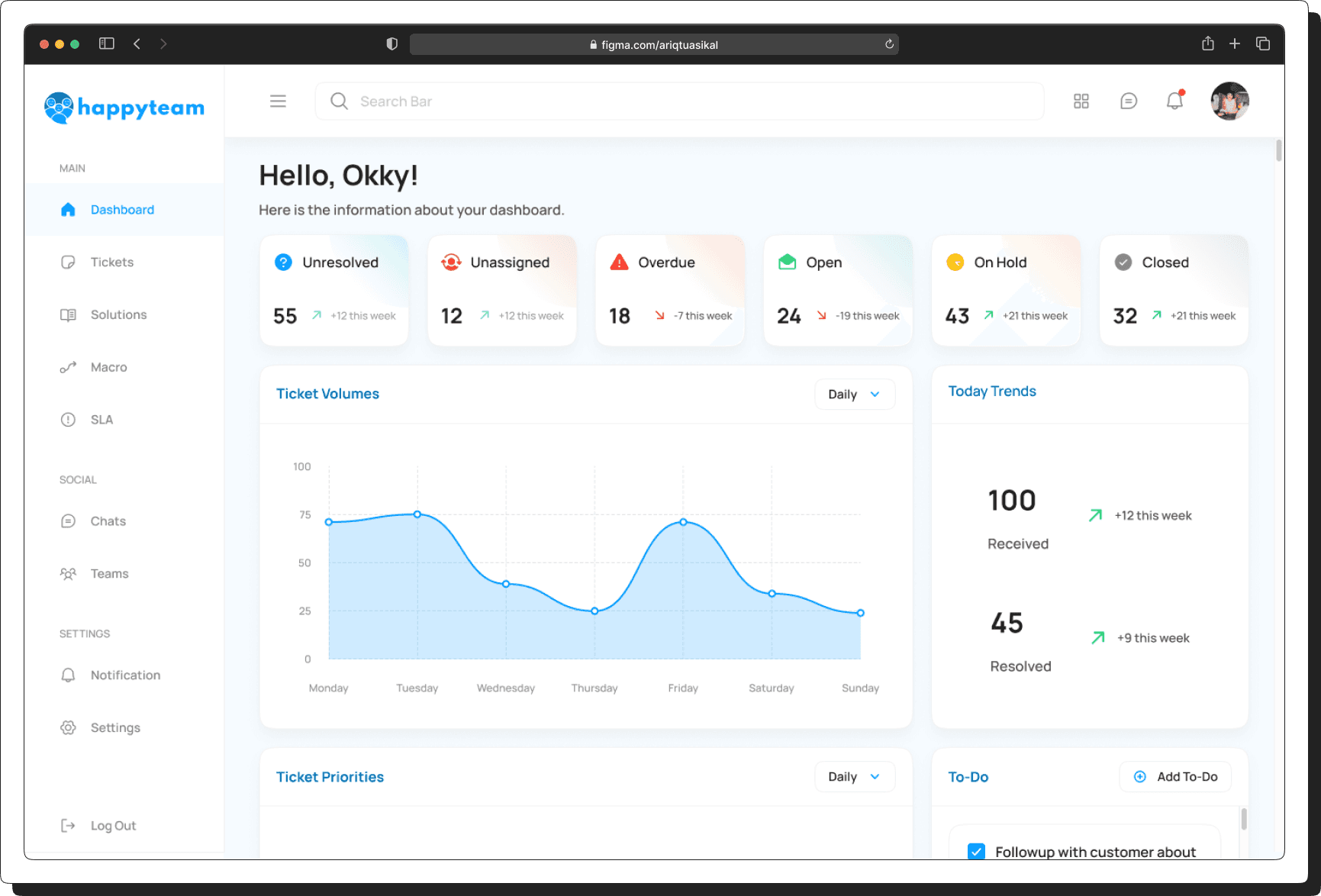
Users can effortlessly track and manage ticketing insights, from ticket volumes and priorities to daily trends, recent activities, handling times, customer satisfaction, and communication channels—all in one place.
1
Ticket Volume – Displays the number of incoming tickets over a specific period.
2
To-Do List – A list of tasks that need to be completed related to tickets.
3
Ticket Priorities – Shows tickets categorized by urgency levels.
4
Daily Trends – Graphs or data showing ticket patterns throughout the day.
5
Recent Activities – A history of the latest actions taken on tickets.
6
Average Handling Time – Data on how quickly tickets are resolved.
7
Customer Satisfaction Rate – Feedback or ratings from customers regarding service quality.
8
Customer Communication Channels – Information on where tickets originate (email, chat, phone, etc.).
[03]
TICKET DETAILS
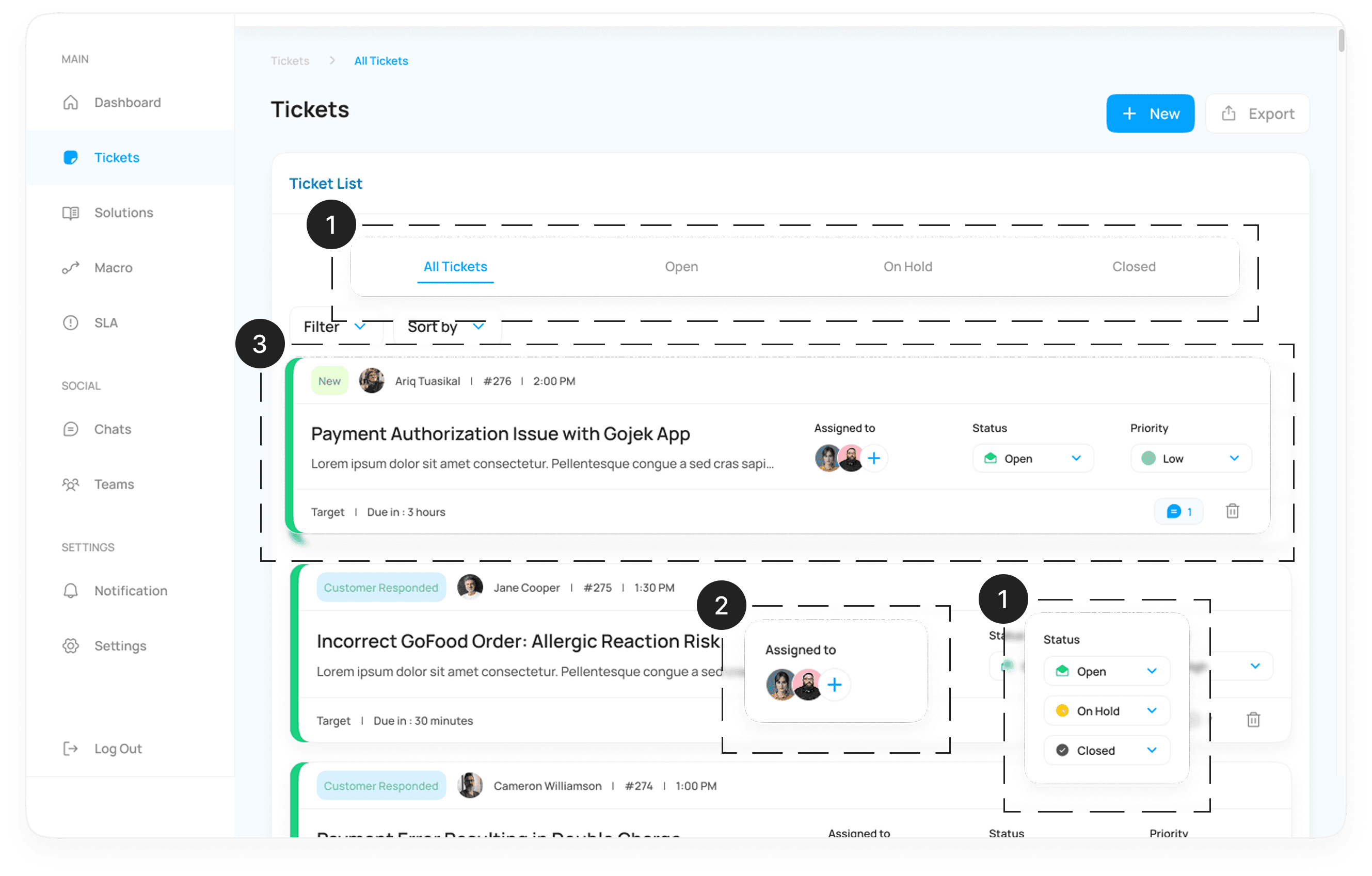
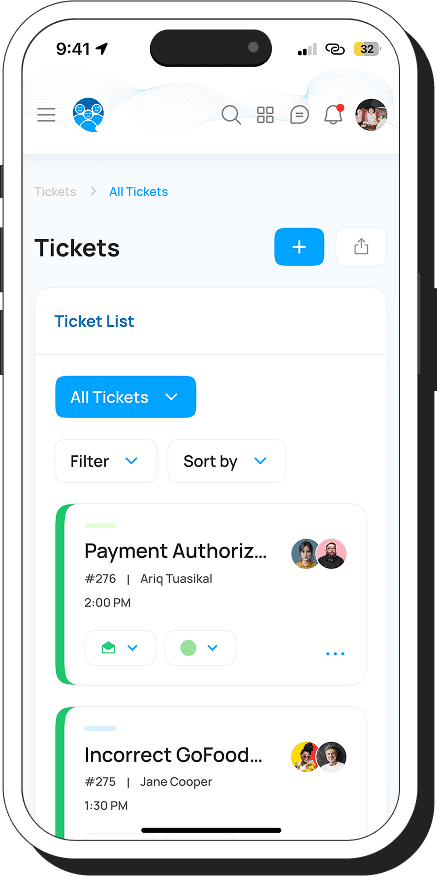
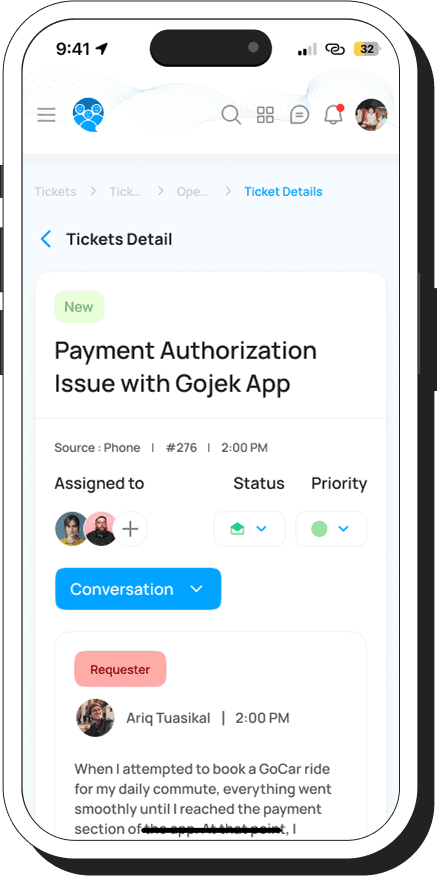
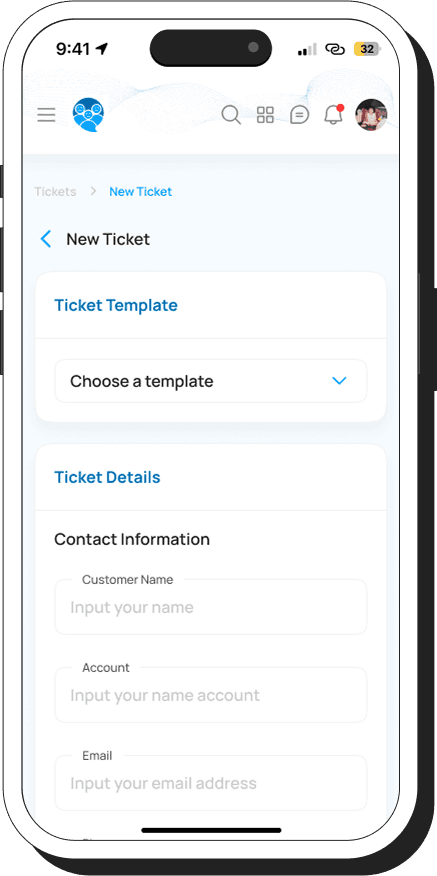
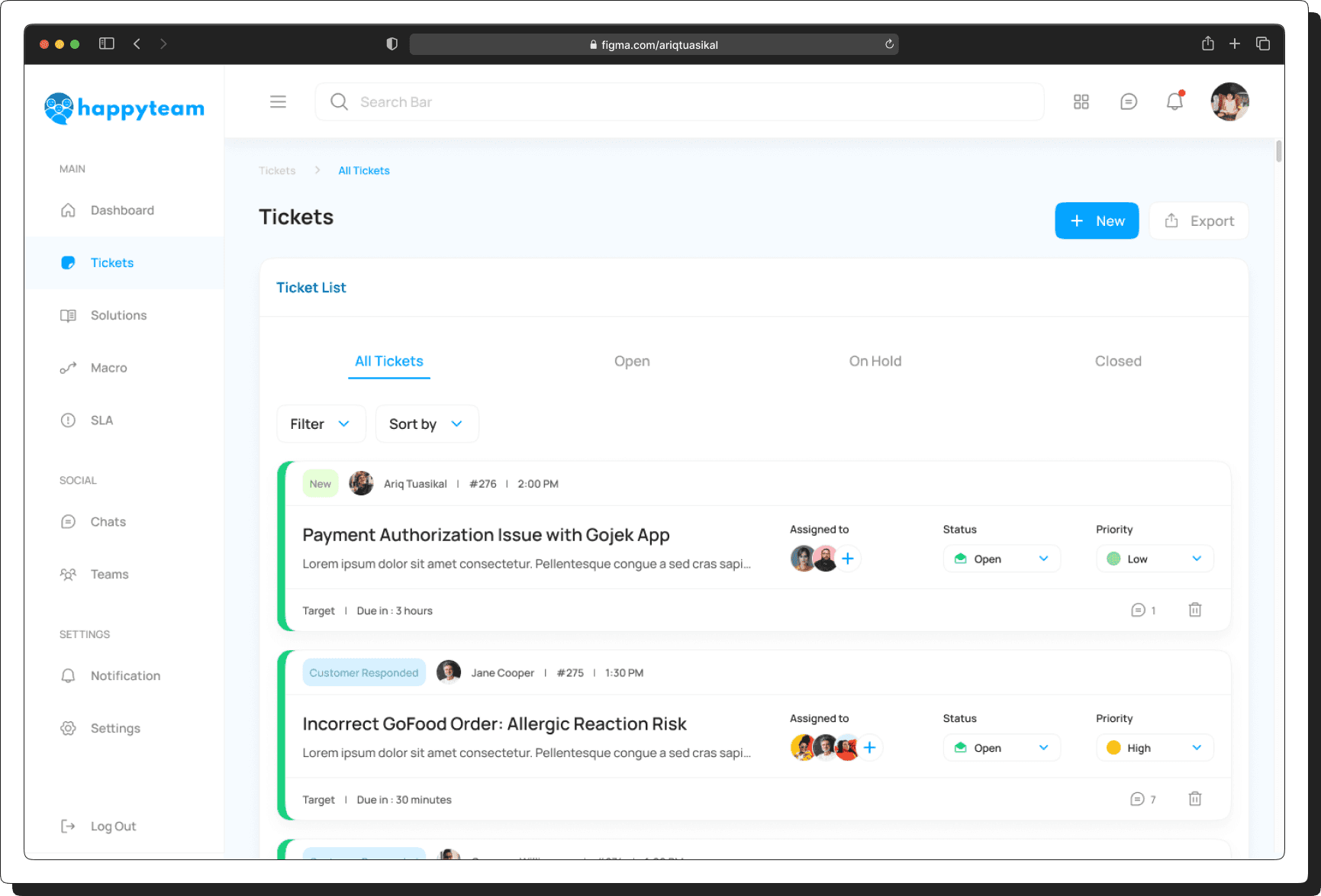
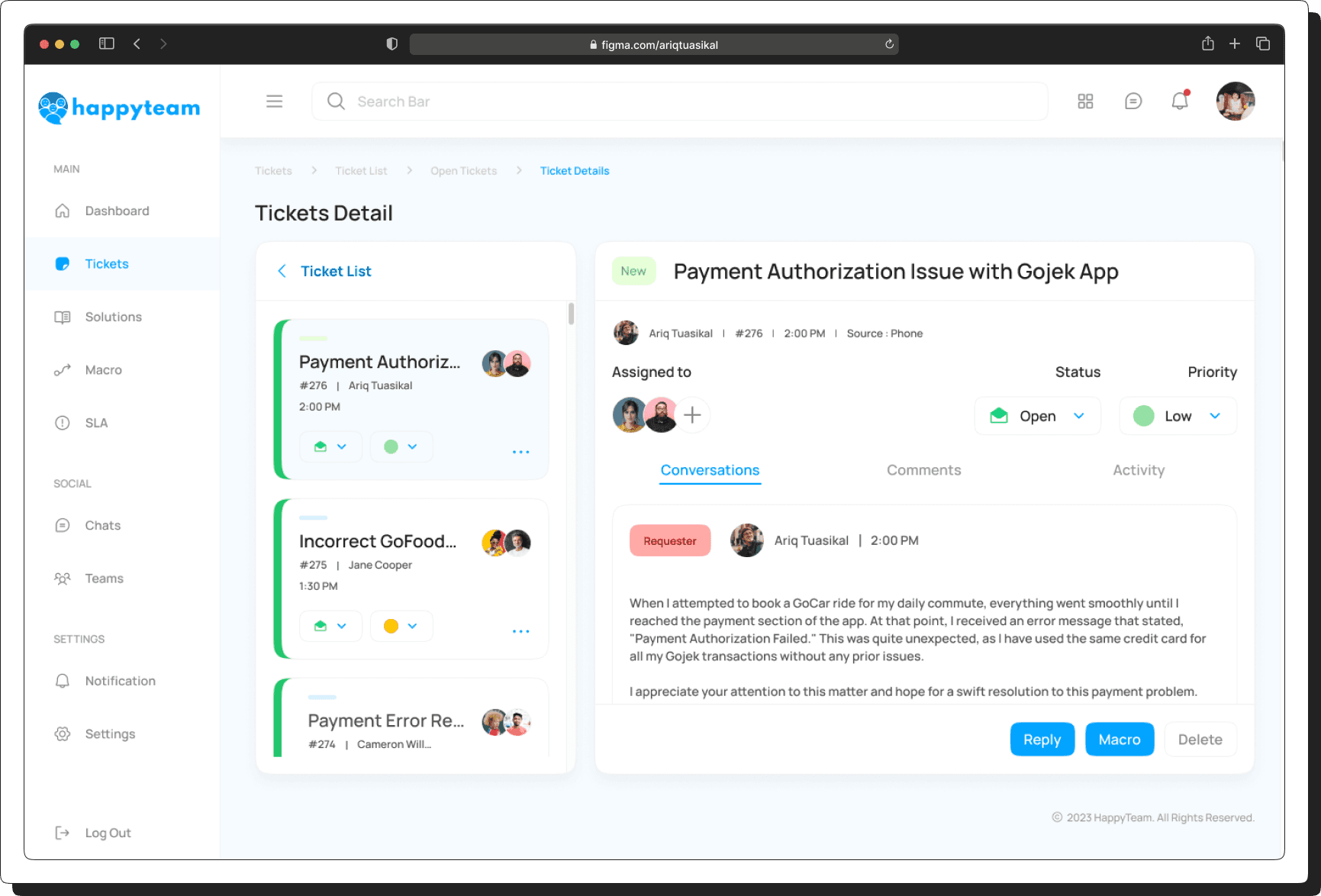
Users can effortlessly switch between tickets (open, on-hold, or closed) and adjust assignees for smooth collaboration. Our intuitive interface simplifies progress tracking, ensuring efficient task management and higher productivity.
1
Quick Ticket Navigation – Easily switch between open, on-hold, or closed tickets.
2
Effortless Assignee Adjustments – Reassign tickets seamlessly for better teamwork.
3
Intuitive Progress Tracking – Stay updated on ticket status in real time.
[04]
SOLUTIONS DETAILS
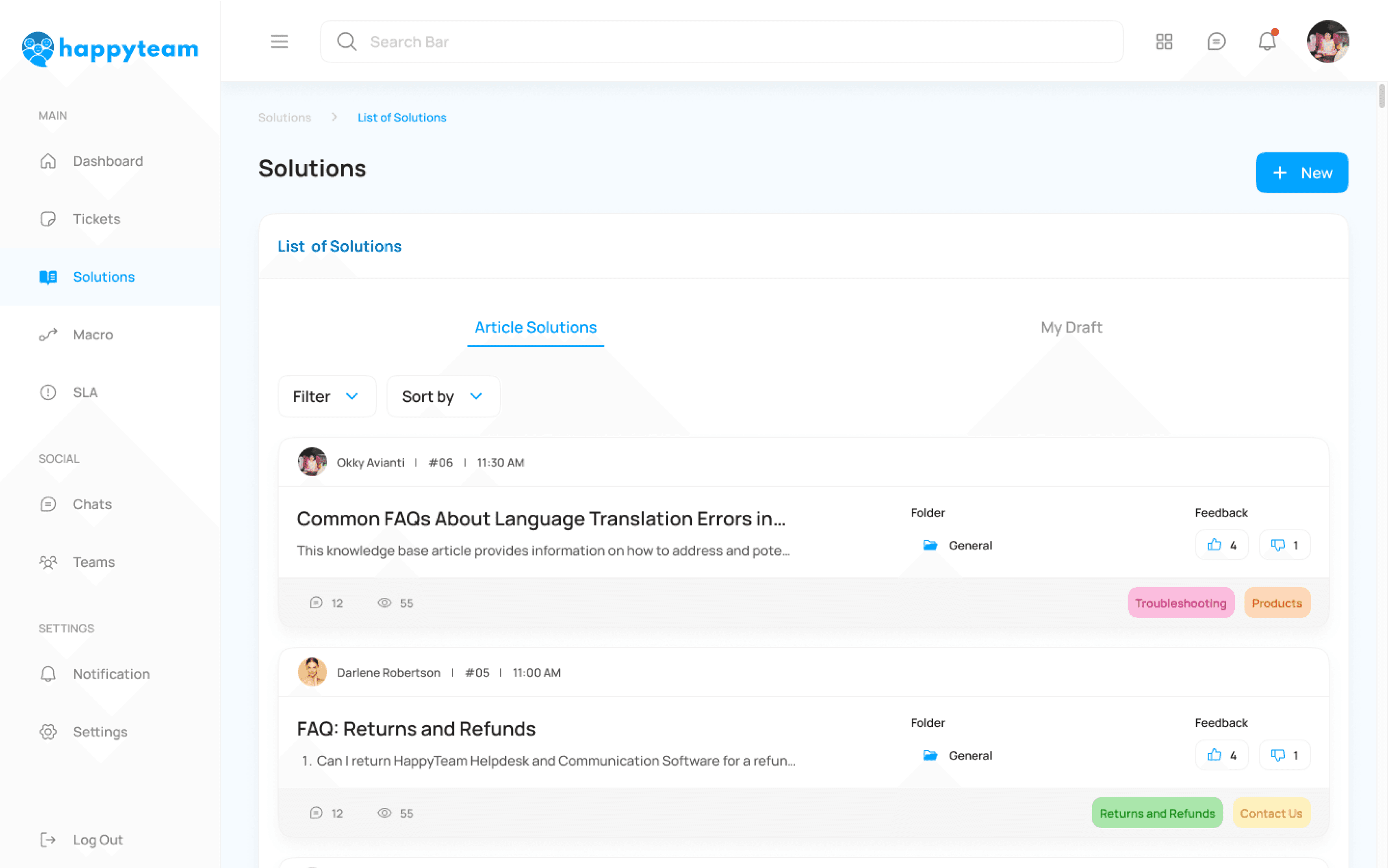
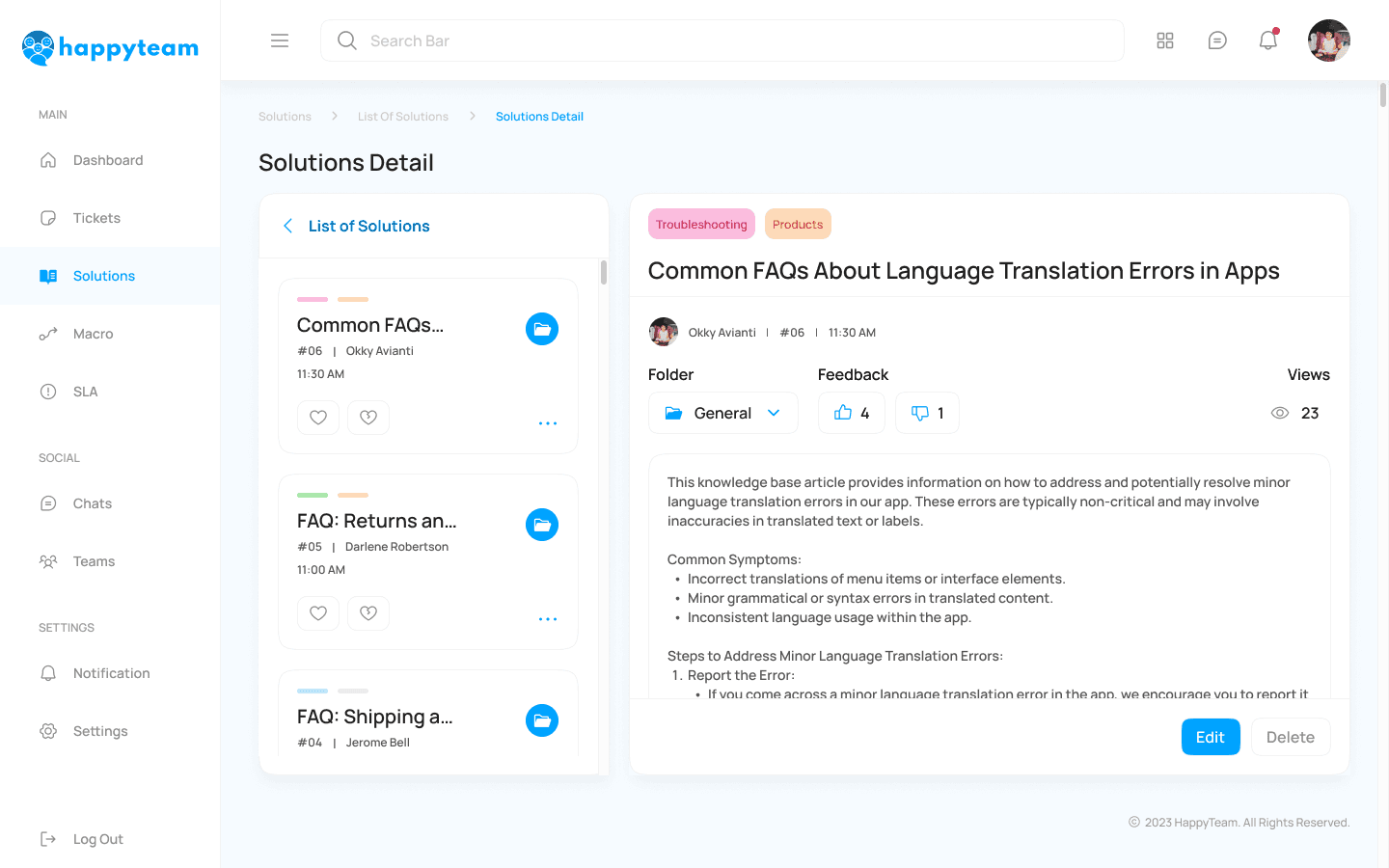
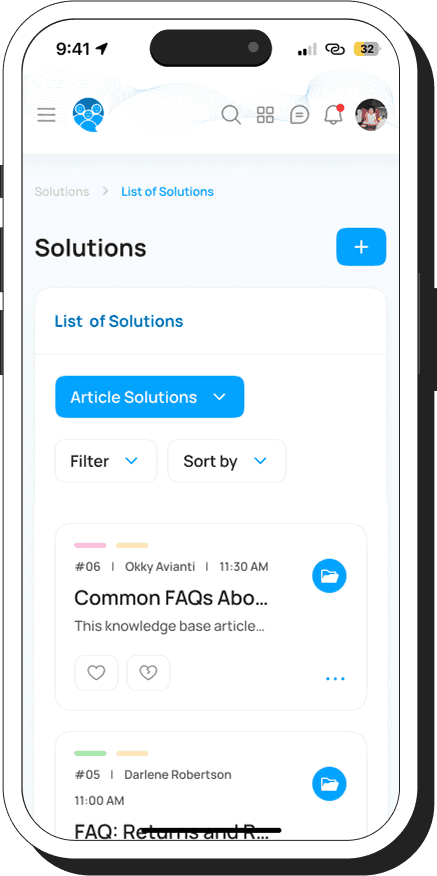
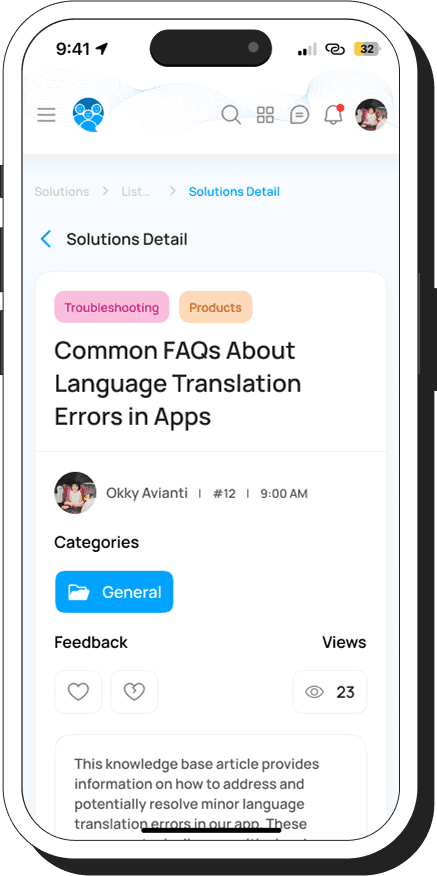
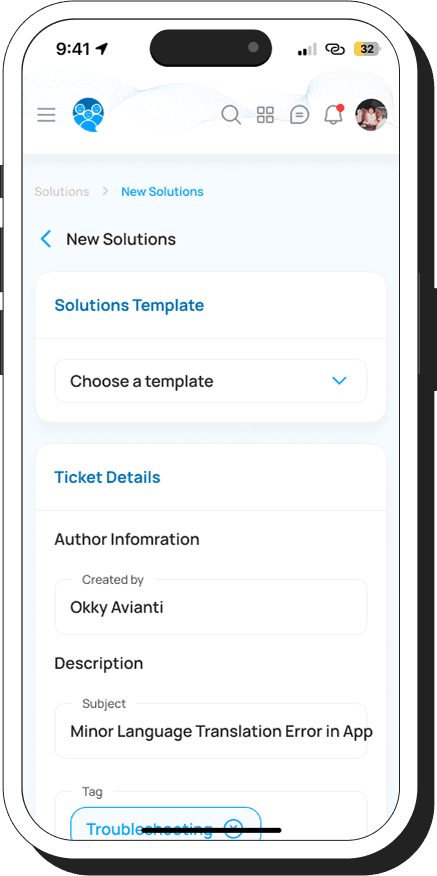
Our automated system keeps users informed by allowing easy FAQ additions and prioritizing popular inquiries for quick resolutions.
[05]
MACRO (AUTOMATIONS)
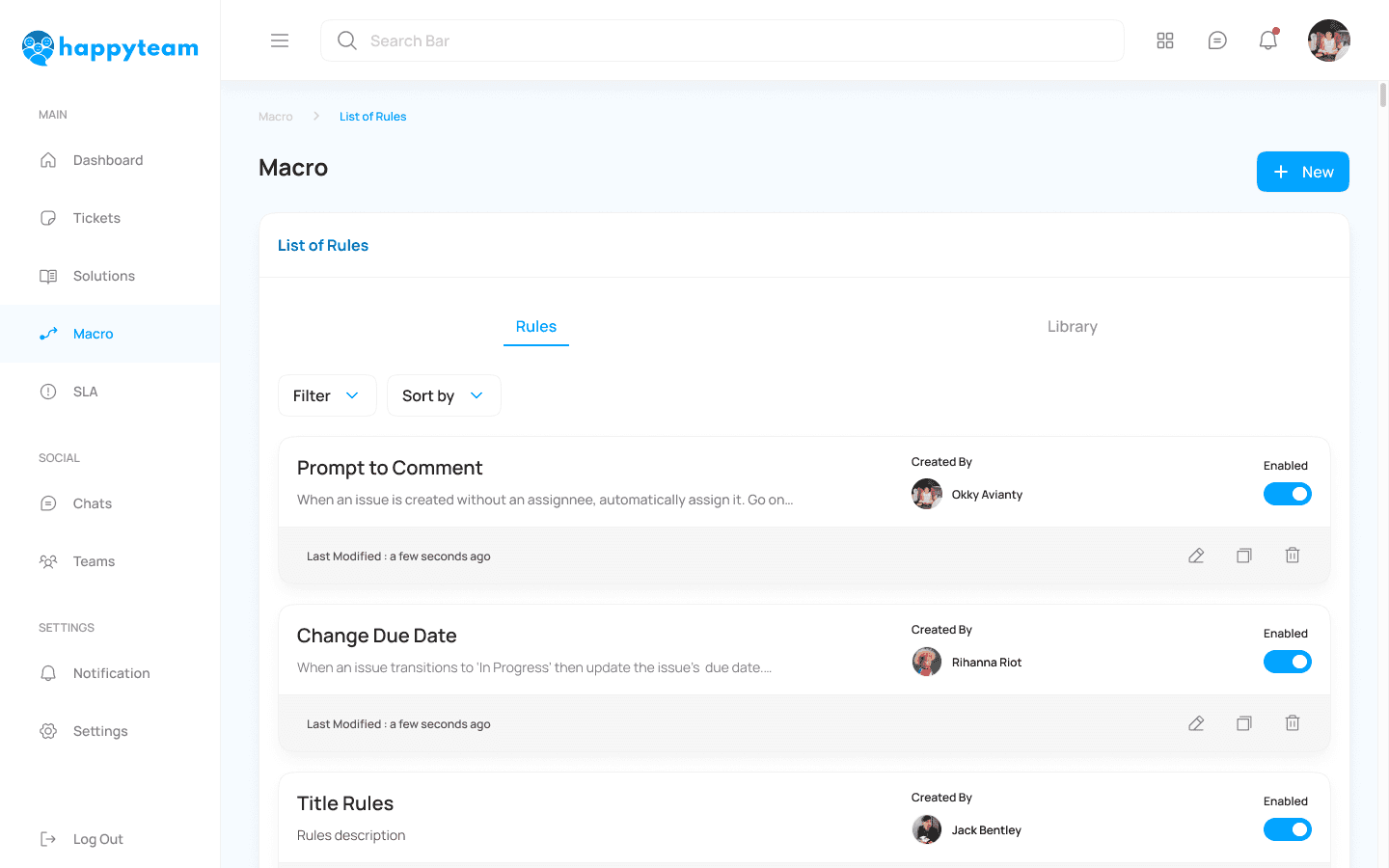
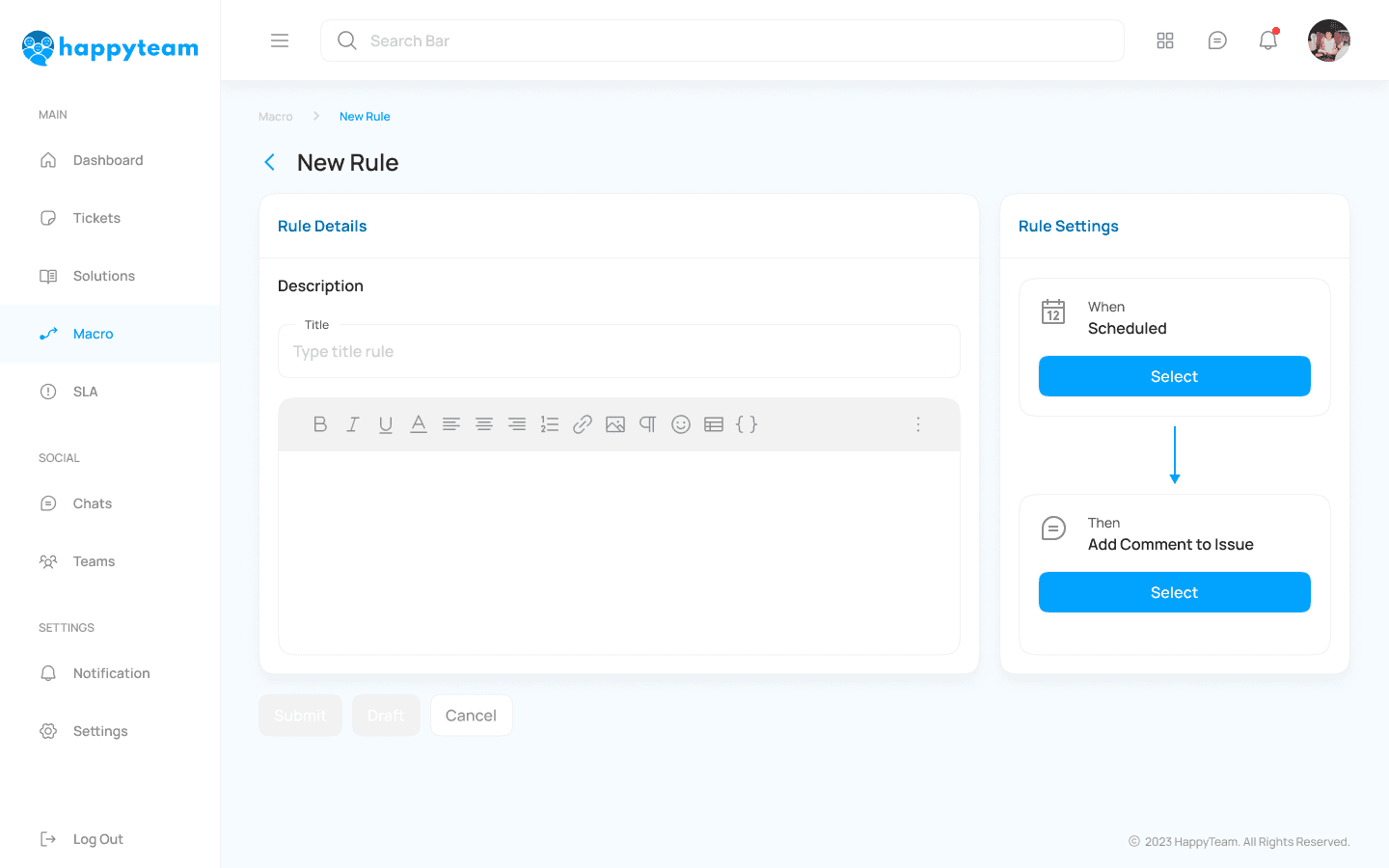
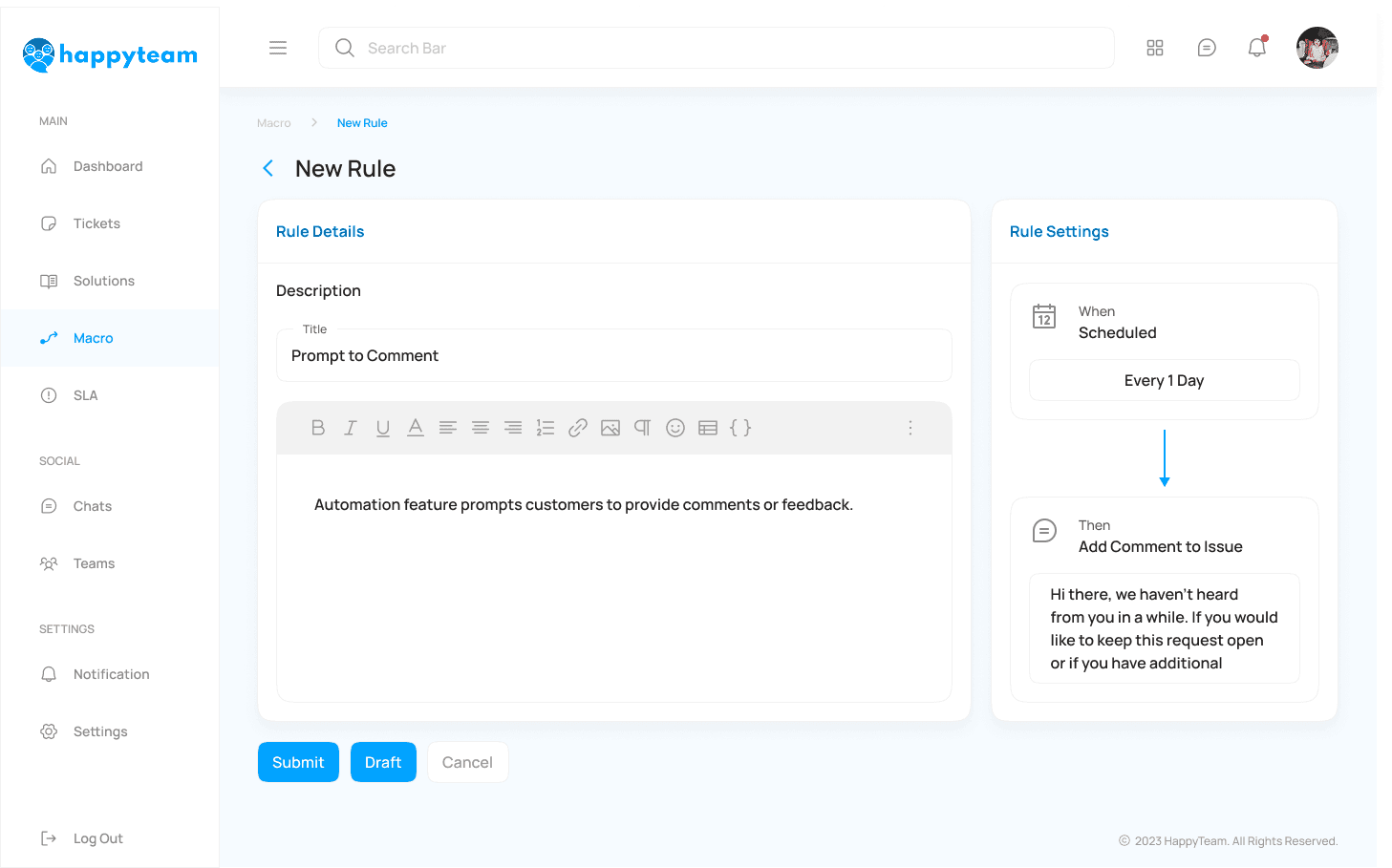
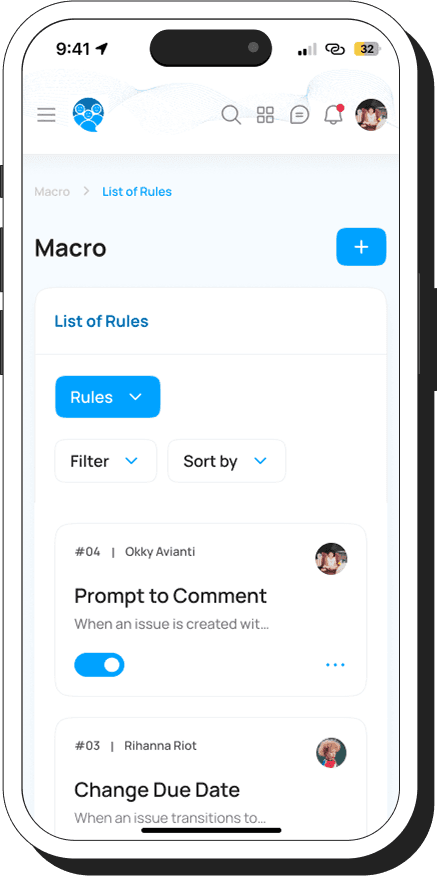
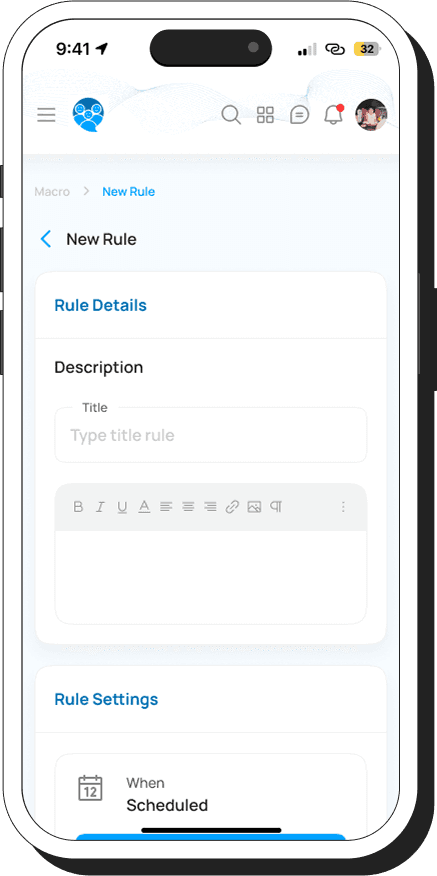
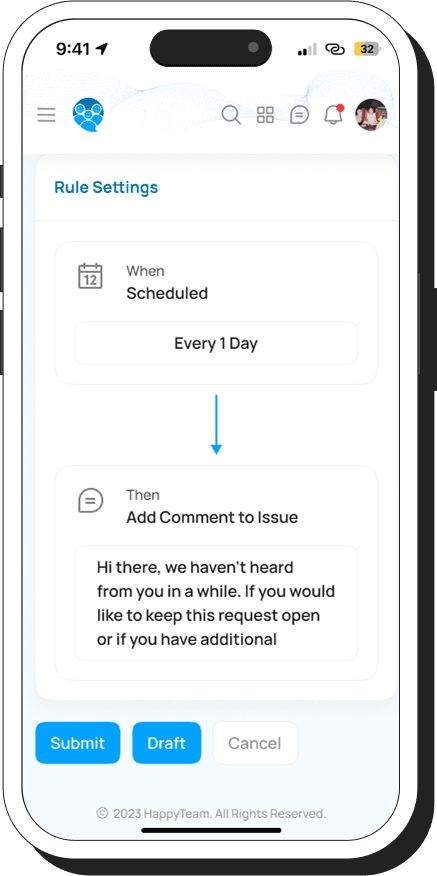
Our customization options empower users to tailor automation for their specific needs. Through triggers and parameters, they simplify repetitive tasks, enhancing daily efficiency. This streamlines task distribution by allowing rule creation for ticket assignments based on issue complexity and agent proficiency, ensuring precise allocation and improving customer satisfaction.
[06]
SLA (SERVICE LEVEL AGGREMENT)
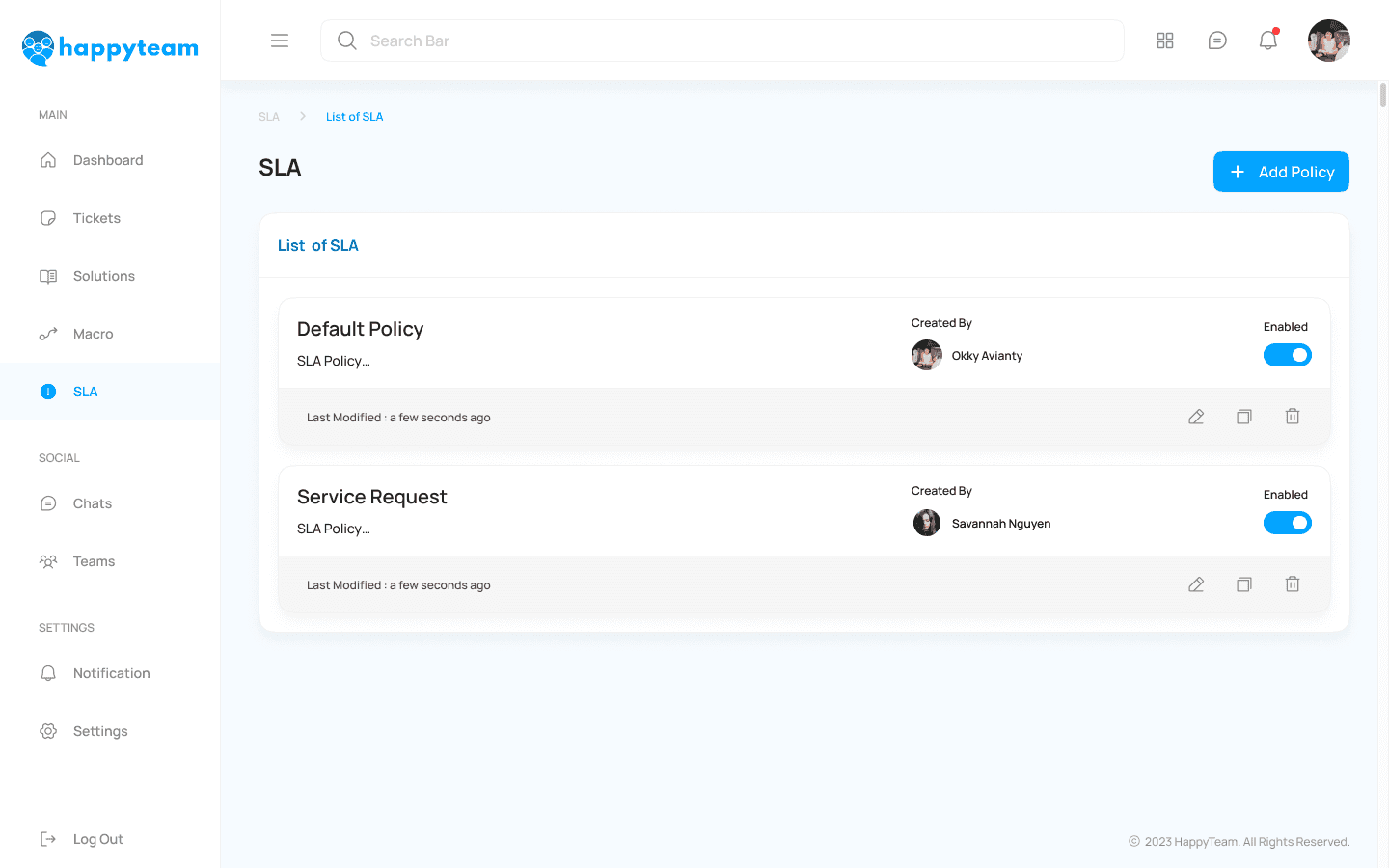
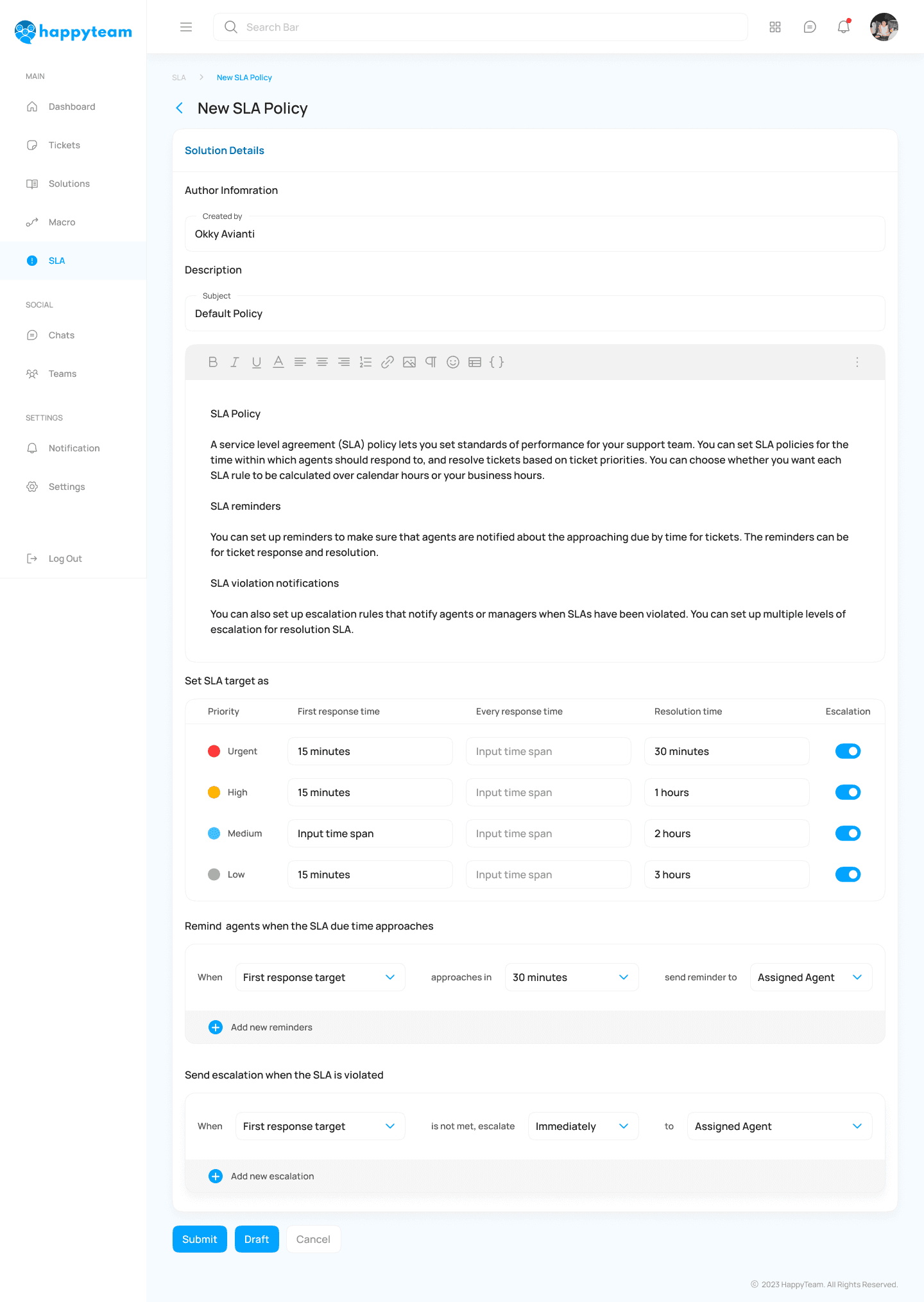
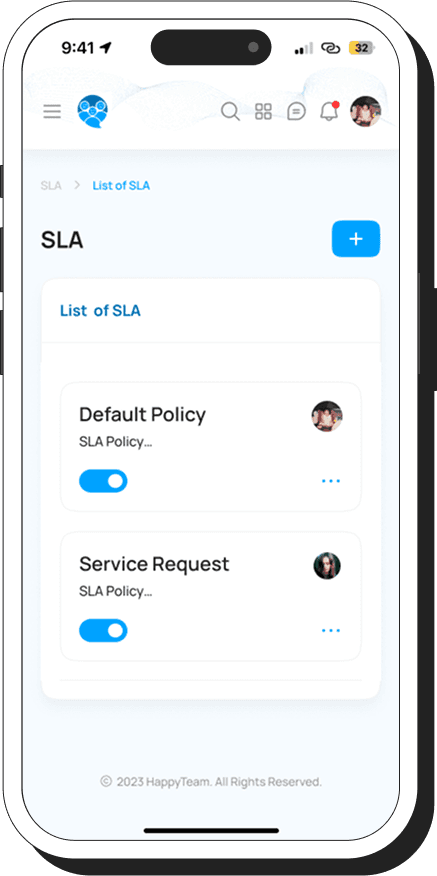
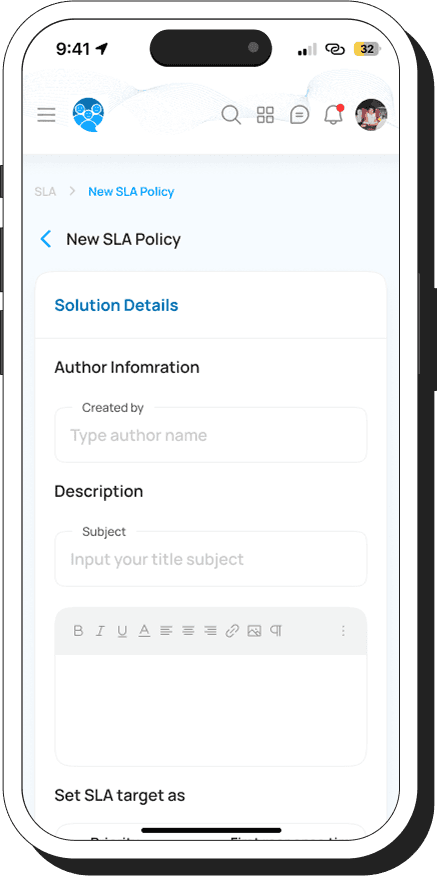
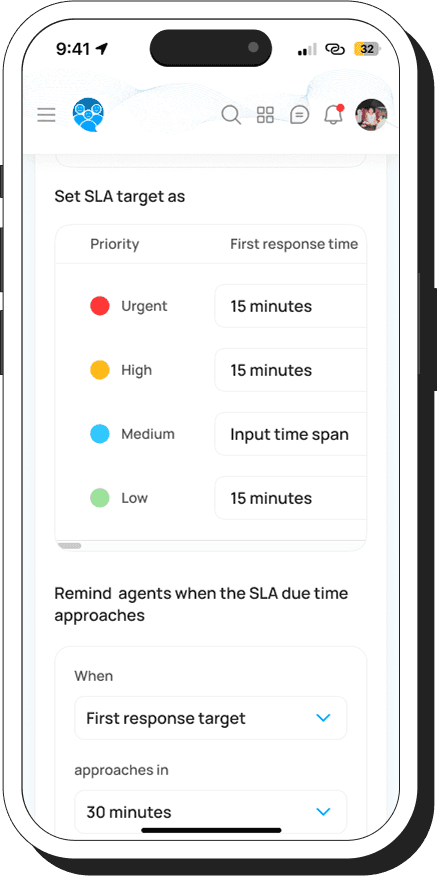
Users have the convenience of configuring universal SLA parameters that are applicable to all tickets within the system. This capability empowers users to enforce uniform service standards comprehensively. By defining response and resolution times, our intelligent system will automatically activate the SLA timer as soon as a ticket is generated.
[07]
CHATS
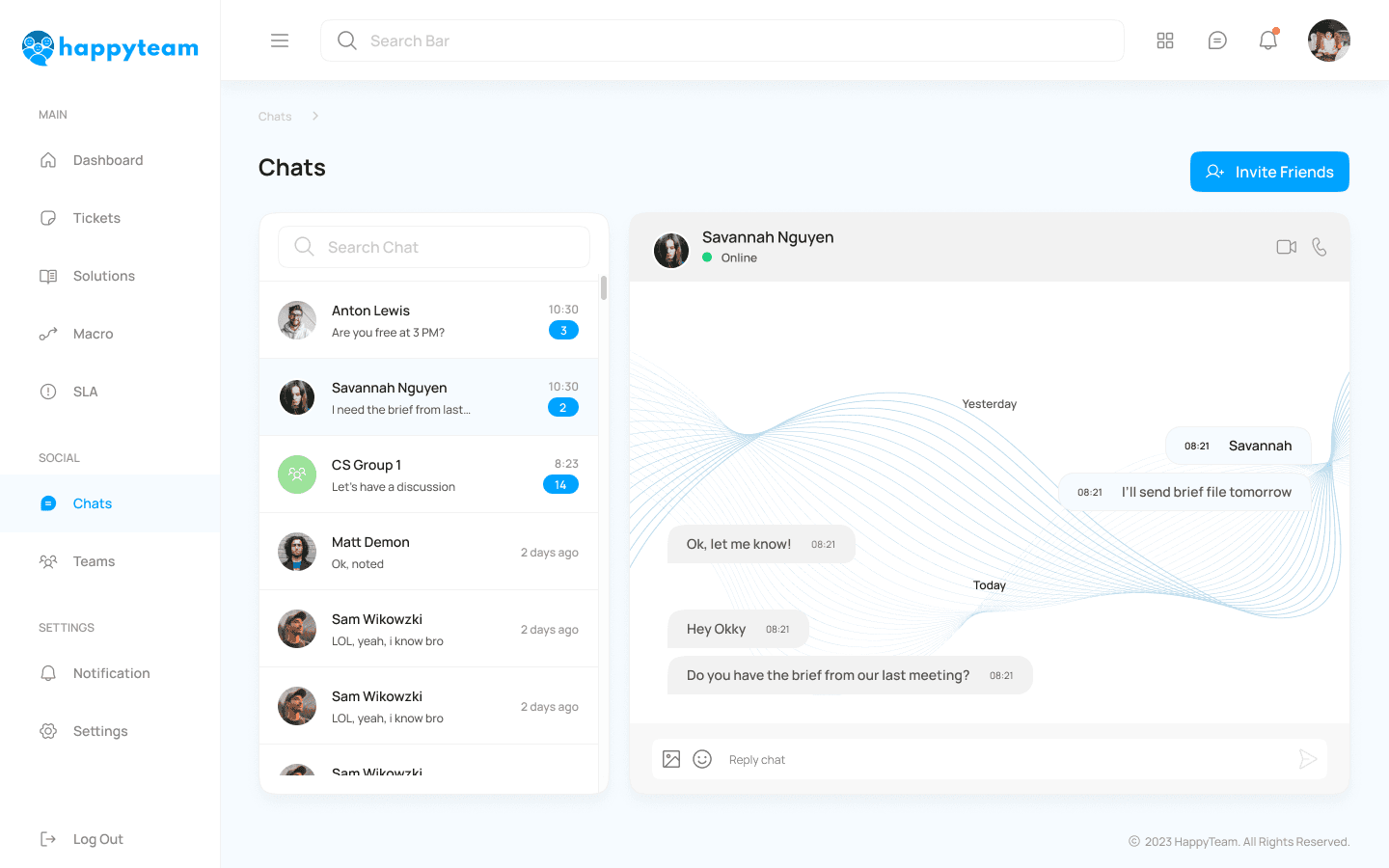
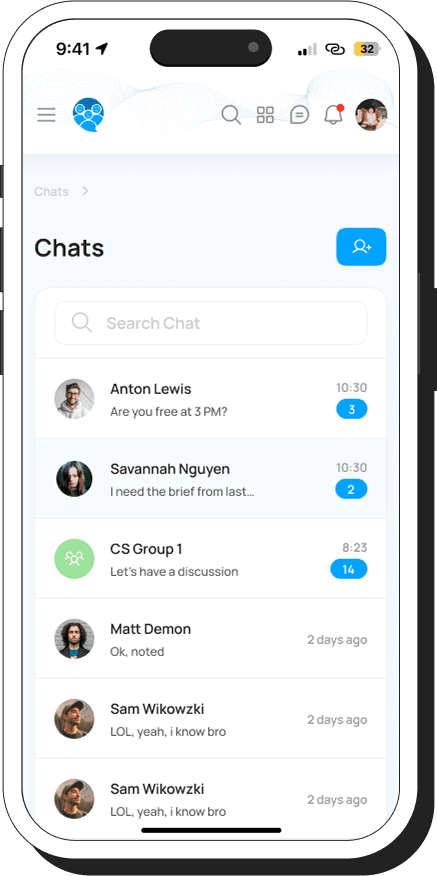
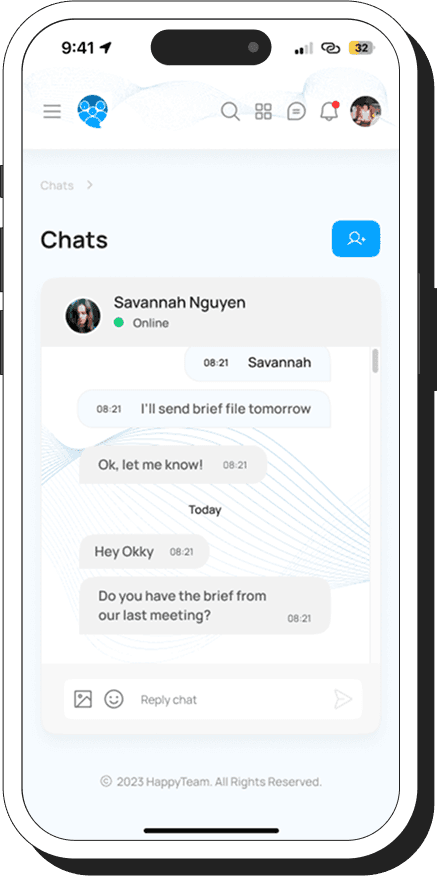
Our platform enables real-time messaging and provides effortless access to a shared chat environment. Here, agents can engage in discussions and collaborate effectively to resolve tickets. Say goodbye to delays in locating the right person to assist with specific issues—now, you can instantly connect with your team members.
[01]
LOGIN PAGE
When visitors access HappyTeam, they are presented with two options: if they don't already have an account, they can create one by signing up. If they already have an account, they can simply log in.
[02]
DASHBOARD
Users can effortlessly track and manage ticketing insights, from ticket volumes and priorities to daily trends, recent activities, handling times, customer satisfaction, and communication channels—all in one place.
1
Ticket Volume – Displays the number of incoming tickets over a specific period.
2
To-Do List – A list of tasks that need to be completed related to tickets.
3
Ticket Priorities – Shows tickets categorized by urgency levels.
4
Daily Trends – Graphs or data showing ticket patterns throughout the day.
5
Recent Activities – A history of the latest actions taken on tickets.
6
Average Handling Time – Data on how quickly tickets are resolved.
7
Customer Satisfaction Rate – Feedback or ratings from customers regarding service quality.
8
Customer Communication Channels – Information on where tickets originate (email, chat, phone, etc.).
[03]
TICKET DETAILS
Users can effortlessly switch between tickets (open, on-hold, or closed) and adjust assignees for smooth collaboration. Our intuitive interface simplifies progress tracking, ensuring efficient task management and higher productivity.
1
Quick Ticket Navigation – Easily switch between open, on-hold, or closed tickets.
2
Effortless Assignee Adjustments – Reassign tickets seamlessly for better teamwork.
3
Intuitive Progress Tracking – Stay updated on ticket status in real time.
[04]
SOLUTIONS DETAILS
Our automated system keeps users informed by allowing easy FAQ additions and prioritizing popular inquiries for quick resolutions.
[05]
MACRO (AUTOMATIONS)
Our customization options empower users to tailor automation for their specific needs. Through triggers and parameters, they simplify repetitive tasks, enhancing daily efficiency. This streamlines task distribution by allowing rule creation for ticket assignments based on issue complexity and agent proficiency, ensuring precise allocation and improving customer satisfaction.
[06]
SLA (SERVICE LEVEL AGGREMENT)
Users have the convenience of configuring universal SLA parameters that are applicable to all tickets within the system. This capability empowers users to enforce uniform service standards comprehensively. By defining response and resolution times, our intelligent system will automatically activate the SLA timer as soon as a ticket is generated.
[07]
CHATS
Our platform enables real-time messaging and provides effortless access to a shared chat environment. Here, agents can engage in discussions and collaborate effectively to resolve tickets. Say goodbye to delays in locating the right person to assist with specific issues—now, you can instantly connect with your team members.
[01]
LOGIN PAGE
When visitors access HappyTeam, they are presented with two options: if they don't already have an account, they can create one by signing up. If they already have an account, they can simply log in.
[02]
DASHBOARD
Users can effortlessly track and manage ticketing insights, from ticket volumes and priorities to daily trends, recent activities, handling times, customer satisfaction, and communication channels—all in one place.
1
Ticket Volume – Displays the number of incoming tickets over a specific period.
2
To-Do List – A list of tasks that need to be completed related to tickets.
3
Ticket Priorities – Shows tickets categorized by urgency levels.
4
Daily Trends – Graphs or data showing ticket patterns throughout the day.
5
Recent Activities – A history of the latest actions taken on tickets.
6
Average Handling Time – Data on how quickly tickets are resolved.
7
Customer Satisfaction Rate – Feedback or ratings from customers regarding service quality.
8
Customer Communication Channels – Information on where tickets originate (email, chat, phone, etc.).
[03]
TICKET DETAILS
Users can effortlessly switch between tickets (open, on-hold, or closed) and adjust assignees for smooth collaboration. Our intuitive interface simplifies progress tracking, ensuring efficient task management and higher productivity.
1
Quick Ticket Navigation – Easily switch between open, on-hold, or closed tickets.
2
Effortless Assignee Adjustments – Reassign tickets seamlessly for better teamwork.
3
Intuitive Progress Tracking – Stay updated on ticket status in real time.
[04]
SOLUTIONS DETAILS
Our automated system keeps users informed by allowing easy FAQ additions and prioritizing popular inquiries for quick resolutions.
[05]
MACRO (AUTOMATIONS)
Our customization options empower users to tailor automation for their specific needs. Through triggers and parameters, they simplify repetitive tasks, enhancing daily efficiency. This streamlines task distribution by allowing rule creation for ticket assignments based on issue complexity and agent proficiency, ensuring precise allocation and improving customer satisfaction.
[06]
SLA (SERVICE LEVEL AGGREMENT)
Users have the convenience of configuring universal SLA parameters that are applicable to all tickets within the system. This capability empowers users to enforce uniform service standards comprehensively. By defining response and resolution times, our intelligent system will automatically activate the SLA timer as soon as a ticket is generated.
[07]
CHATS
Our platform enables real-time messaging and provides effortless access to a shared chat environment. Here, agents can engage in discussions and collaborate effectively to resolve tickets. Say goodbye to delays in locating the right person to assist with specific issues—now, you can instantly connect with your team members.
[01]
LOGIN PAGE
When visitors access HappyTeam, they are presented with two options: if they don't already have an account, they can create one by signing up. If they already have an account, they can simply log in.
[02]
DASHBOARD
Users can effortlessly track and manage ticketing insights, from ticket volumes and priorities to daily trends, recent activities, handling times, customer satisfaction, and communication channels—all in one place.
1
Ticket Volume – Displays the number of incoming tickets over a specific period.
2
To-Do List – A list of tasks that need to be completed related to tickets.
3
Ticket Priorities – Shows tickets categorized by urgency levels.
4
Daily Trends – Graphs or data showing ticket patterns throughout the day.
5
Recent Activities – A history of the latest actions taken on tickets.
6
Average Handling Time – Data on how quickly tickets are resolved.
7
Customer Satisfaction Rate – Feedback or ratings from customers regarding service quality.
8
Customer Communication Channels – Information on where tickets originate (email, chat, phone, etc.).
[03]
TICKET DETAILS
Users can effortlessly switch between tickets (open, on-hold, or closed) and adjust assignees for smooth collaboration. Our intuitive interface simplifies progress tracking, ensuring efficient task management and higher productivity.
1
Quick Ticket Navigation – Easily switch between open, on-hold, or closed tickets.
2
Effortless Assignee Adjustments – Reassign tickets seamlessly for better teamwork.
3
Intuitive Progress Tracking – Stay updated on ticket status in real time.
[04]
SOLUTIONS DETAILS
Our automated system keeps users informed by allowing easy FAQ additions and prioritizing popular inquiries for quick resolutions.
[05]
MACRO (AUTOMATIONS)
Our customization options empower users to tailor automation for their specific needs. Through triggers and parameters, they simplify repetitive tasks, enhancing daily efficiency. This streamlines task distribution by allowing rule creation for ticket assignments based on issue complexity and agent proficiency, ensuring precise allocation and improving customer satisfaction.
[06]
SLA (SERVICE LEVEL AGGREMENT)
Users have the convenience of configuring universal SLA parameters that are applicable to all tickets within the system. This capability empowers users to enforce uniform service standards comprehensively. By defining response and resolution times, our intelligent system will automatically activate the SLA timer as soon as a ticket is generated.
[07]
CHATS
Our platform enables real-time messaging and provides effortless access to a shared chat environment. Here, agents can engage in discussions and collaborate effectively to resolve tickets. Say goodbye to delays in locating the right person to assist with specific issues—now, you can instantly connect with your team members.
[01]
LOGIN PAGE
[02]
DASHBOARD
Users can effortlessly track and manage ticketing insights, from ticket volumes and priorities to daily trends, recent activities, handling times, customer satisfaction, and communication channels—all in one place.
1
Ticket Volume – Displays the number of incoming tickets over a specific period.
2
To-Do List – A list of tasks that need to be completed related to tickets.
3
Ticket Priorities – Shows tickets categorized by urgency levels.
4
Daily Trends – Graphs or data showing ticket patterns throughout the day.
5
Recent Activities – A history of the latest actions taken on tickets.
6
Average Handling Time – Data on how quickly tickets are resolved.
7
Customer Satisfaction Rate – Feedback or ratings from customers regarding service quality.
8
Customer Satisfaction Rate – Feedback or ratings from customers regarding service quality.
[03]
TICKET DETAILS
Users can effortlessly switch between tickets (open, on-hold, or closed) and adjust assignees for smooth collaboration. Our intuitive interface simplifies progress tracking, ensuring efficient task management and higher productivity.
1
Quick Ticket Navigation – Easily switch between open, on-hold, or closed tickets.
2
Effortless Assignee Adjustments – Reassign tickets seamlessly for better teamwork.
3
Intuitive Progress Tracking – Stay updated on ticket status in real time.
[04]
SOLUTIONS DETAILS
Our automated system keeps users informed by allowing easy FAQ additions and prioritizing popular inquiries for quick resolutions.
[05]
MACRO (AUTOMATIONS)
Our customization options empower users to tailor automation for their specific needs. Through triggers and parameters, they simplify repetitive tasks, enhancing daily efficiency. This streamlines task distribution by allowing rule creation for ticket assignments based on issue complexity and agent proficiency, ensuring precise allocation and improving customer satisfaction.
[06]
SLA (SERVICE LEVEL AGGREMENT)
Users have the convenience of configuring universal SLA parameters that are applicable to all tickets within the system. This capability empowers users to enforce uniform service standards comprehensively. By defining response and resolution times, our intelligent system will automatically activate the SLA timer as soon as a ticket is generated.
[07]
CHATS
Our platform enables real-time messaging and provides effortless access to a shared chat environment. Here, agents can engage in discussions and collaborate effectively to resolve tickets. Say goodbye to delays in locating the right person to assist with specific issues—now, you can instantly connect with your team members.
MOBILE DESIGN
MOBILE DESIGN
[01]
DASHBOARD
[02]
TICKET DETAILS
[03]
SOLUTIONS DETAILS
[04]
MACRO (AUTOMATIONS)
[05]
SLA (SERVICE LEVEL AGGREMENT)
[06]
CHATS
[01]
DASHBOARD
[02]
TICKET DETAILS
[03]
SOLUTIONS DETAILS
[04]
MACRO (AUTOMATIONS)
[05]
SLA (SERVICE LEVEL AGGREMENT)
[06]
CHATS
[01]
DASHBOARD
[02]
TICKET DETAILS
[03]
SOLUTIONS DETAILS
[04]
MACRO (AUTOMATIONS)
[05]
SLA (SERVICE LEVEL AGGREMENT)
[06]
CHATS
[01]
DASHBOARD
[02]
TICKET DETAILS
[03]
SOLUTIONS DETAILS
[04]
MACRO (AUTOMATIONS)
[05]
SLA (SERVICE LEVEL AGGREMENT)
[06]
CHATS
[01]
DASHBOARD
[02]
TICKET DETAILS
[03]
SOLUTIONS DETAILS
[04]
MACRO (AUTOMATIONS)
[05]
SLA (SERVICE LEVEL AGGREMENT)
[06]
CHATS
04.
04.
Conduct Usability Testing
Conduct Usability Testing
[type]
Unmoderated
[duration]
10-15 minutes
[participant]
5 Users
[tools]
[testing.remotely]
[testing.remotely]
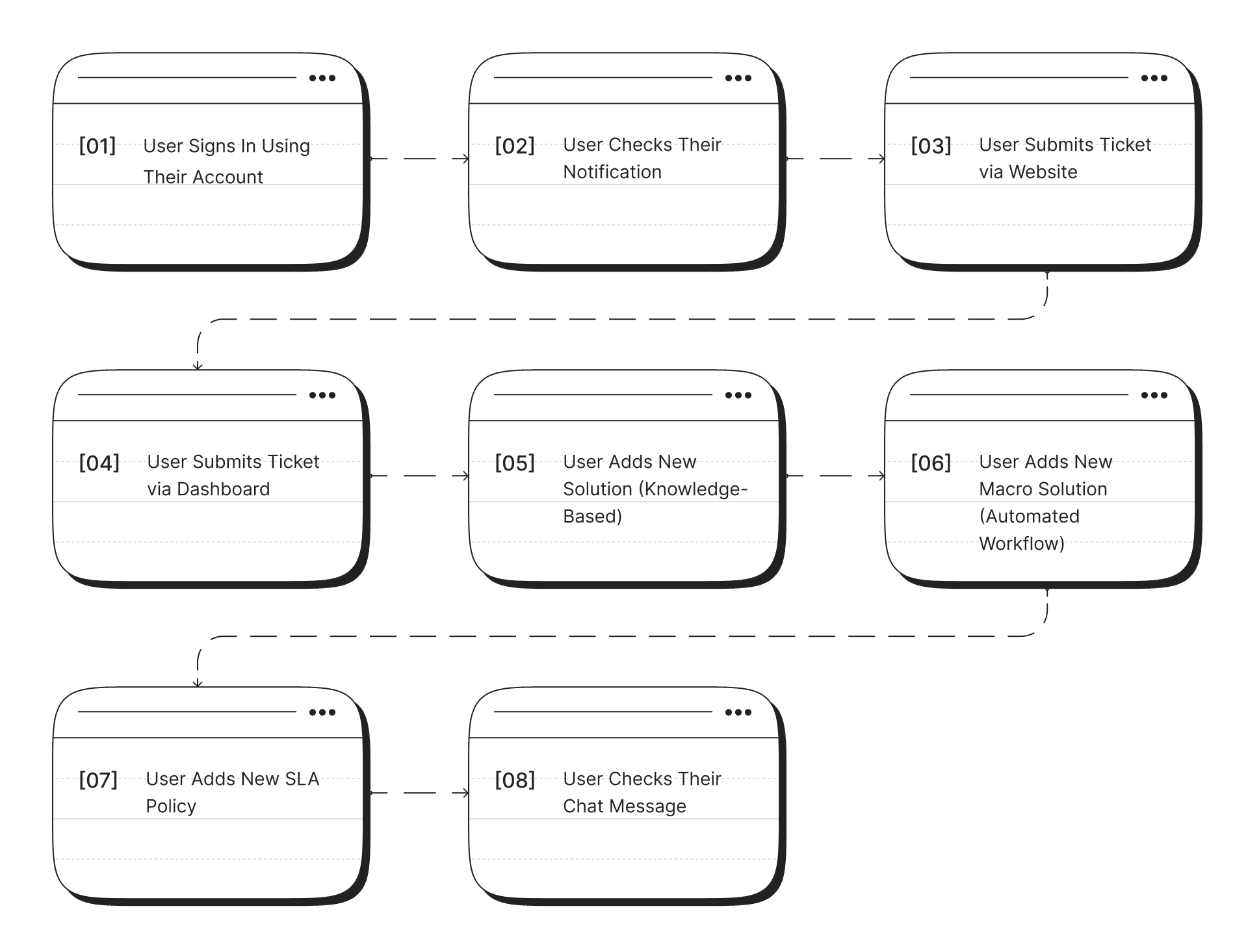
Eight tasks have been created to assess whether users can effectively complete them, and the results will help determine the user-friendliness of the application.
[task]
[result]
[task]
[result]
[task]
[result]
[summary.&.conclusion]
[summary.&.conclusion]
Based on the results of the usability testing I conducted, I have successfully achieved an average success rate of 93.75%. These results indicate that the design I have created effectively addresses user issues. Out of the 8 tasks that were tested, four of them, namely the first, second, third, and fourth tasks, were completed perfectly by the users.
However, in the second and sixth tasks, which involved adding a new macro solution (automated workflow) and finding real-time alerts or notifications, some users encountered difficulties in completing these tasks. I have identified areas that require improvement in my design to enhance the user experience when dealing with these specific tasks.
In conclusion, the results of the usability testing confirm that my design has been successful in most cases, but there is room for improvement to help users overcome challenges they may face in certain tasks. I am committed to continuously improving my design to provide the best possible user experience.
Based on the results of the usability testing I conducted, I have successfully achieved an average success rate of 93.75%. These results indicate that the design I have created effectively addresses user issues. Out of the 8 tasks that were tested, four of them, namely the first, second, third, and fourth tasks, were completed perfectly by the users.
However, in the second and sixth tasks, which involved adding a new macro solution (automated workflow) and finding real-time alerts or notifications, some users encountered difficulties in completing these tasks. I have identified areas that require improvement in my design to enhance the user experience when dealing with these specific tasks.
In conclusion, the results of the usability testing confirm that my design has been successful in most cases, but there is room for improvement to help users overcome challenges they may face in certain tasks. I am committed to continuously improving my design to provide the best possible user experience.
[type]
Unmoderated
[duration]
10-15 minutes
[participant]
5 User
[tools]
THANK YOU!
and hope to hear from you soon.
THANK YOU!
and hope to hear from you soon.